Nikhil
Good AI couple photo prompts give each person a clear role in the picture. "A romantic couple at sunset" describes a mood, but it does not tell the model whose face to preserve, where each person stands, or how they interact. Those details matter more than a long string of words like perfect, beautiful or cinematic.
Below are 16 copyable couple photo prompts: eight illustrated reference edits, including a pose revision, and eight additional ideas to adapt. Start with a photo of you both, choose a simple pose, and change the location or lighting before attempting complicated body contact.
For portraits, products and other subjects, use the broader AI photoshoot prompt library. Bringing children or grandparents into the picture? Explore AI family photo prompts for group arrangements and eight illustrated styles. This guide focuses specifically on two-person identity, placement and believable interaction, rather than repeating that collection.
Choose the reference before the prompt
A joint photo is the simplest starting point: both faces, their relative height and the existing relationship between their bodies are visible together. Look for similar light on both people, sharp eyes and a camera angle you can recognize. Avoid a photo in which one face is tiny, hidden behind hair or turned completely away.
Two separate references can help when you do not have a suitable joint photo, but only use a model whose current input controls accept multiple reference images. In that workflow, explain which reference belongs to which person and where each should appear. Do not assume every image model accepts two uploads or interprets reference order in the same way.
| Starting material | Good first direction | What to watch |
|---|---|---|
| A clear photo of you together | New background, similar pose | Face changes caused by a large pose change |
| Two separate adult portraits | Simple side-by-side composition | Different camera angles, light and scale |
| An old or blurry photograph | A modest edit with minimal restyling | Invented facial detail; a prompt cannot recover missing evidence |
| No reference photo | An entirely fictional couple | A text description will not reliably reproduce a real person's face |
Use photos you own or have permission to edit, with the consent of both adults. Do not present a generated encounter or relationship as an event that really happened. Keep private reference photos out of public example galleries unless everyone pictured agrees.
One reference, eight generated edits
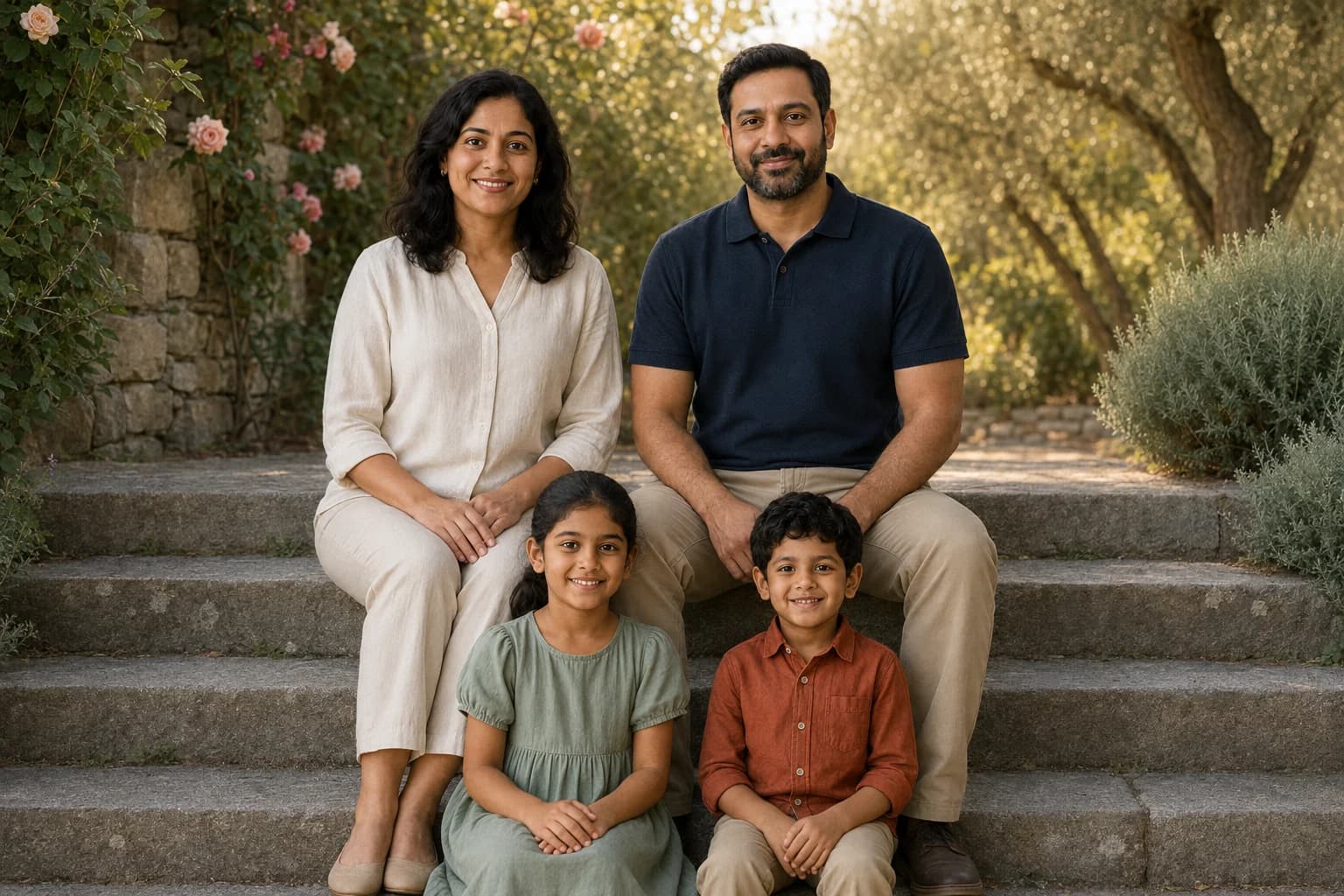
This is the synthetic reference used for the eight examples below. It depicts fictional adults, not customers. Keeping one reference makes it easier to see what changed when the setting, light or pose instruction changed.
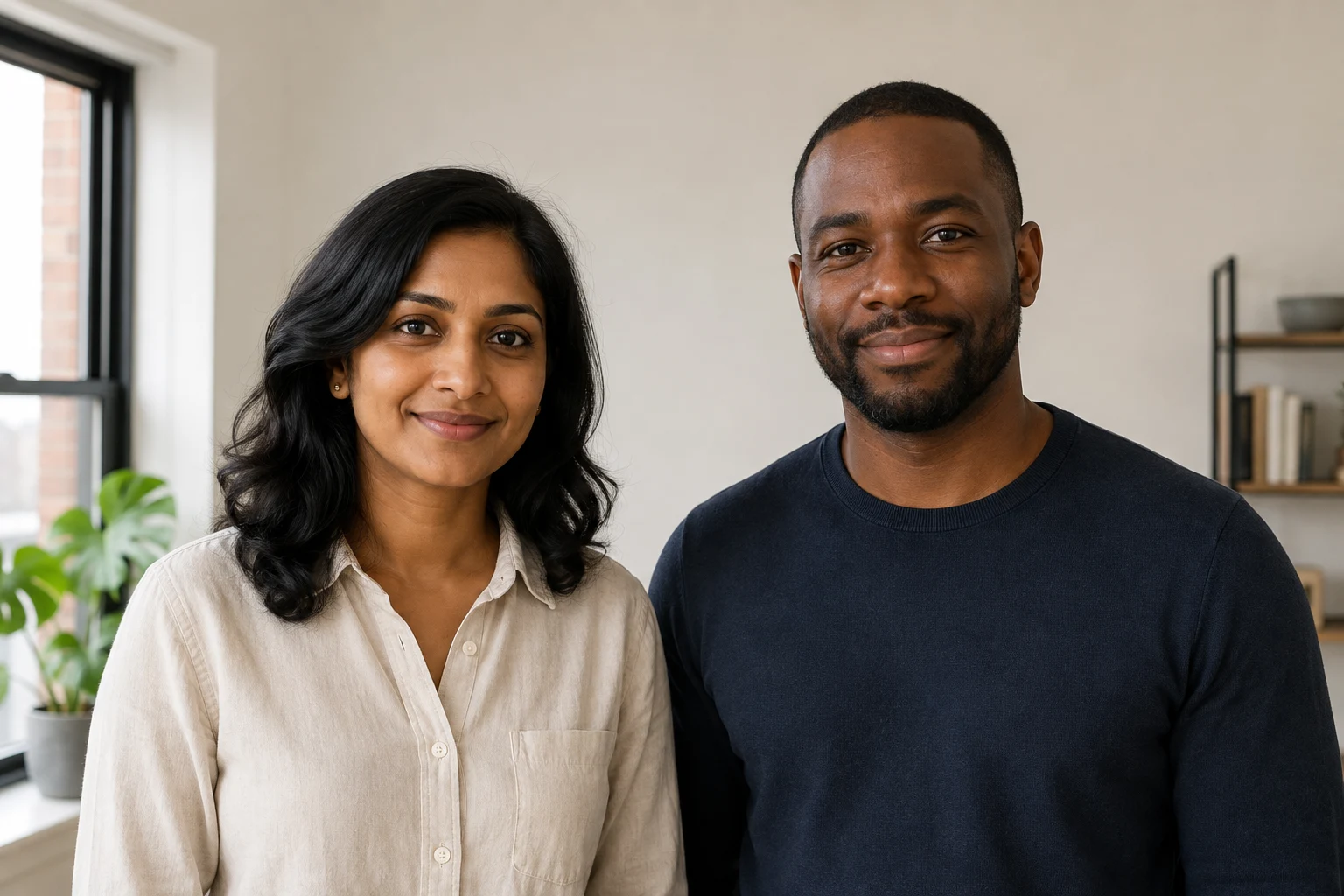
How these examples were made: On September 4, 2026, we generated the reference and eight edits using Codex's built-in OpenAI image-generation tool. Each edit received the same reference and the exact accompanying prompt. These are illustrative prompting checks, not a benchmark of HighReach's image models or a guarantee of identity preservation. Prompts 1-8 have example outputs; prompts 9-16 are starting points without published outputs. Model choice, settings and your reference can produce different results.
1. A quiet sunset anniversary
Keep the clothing and framing familiar while changing the setting and gaze. This makes the instruction easier to evaluate than changing the location, outfits and full-body pose at the same time.
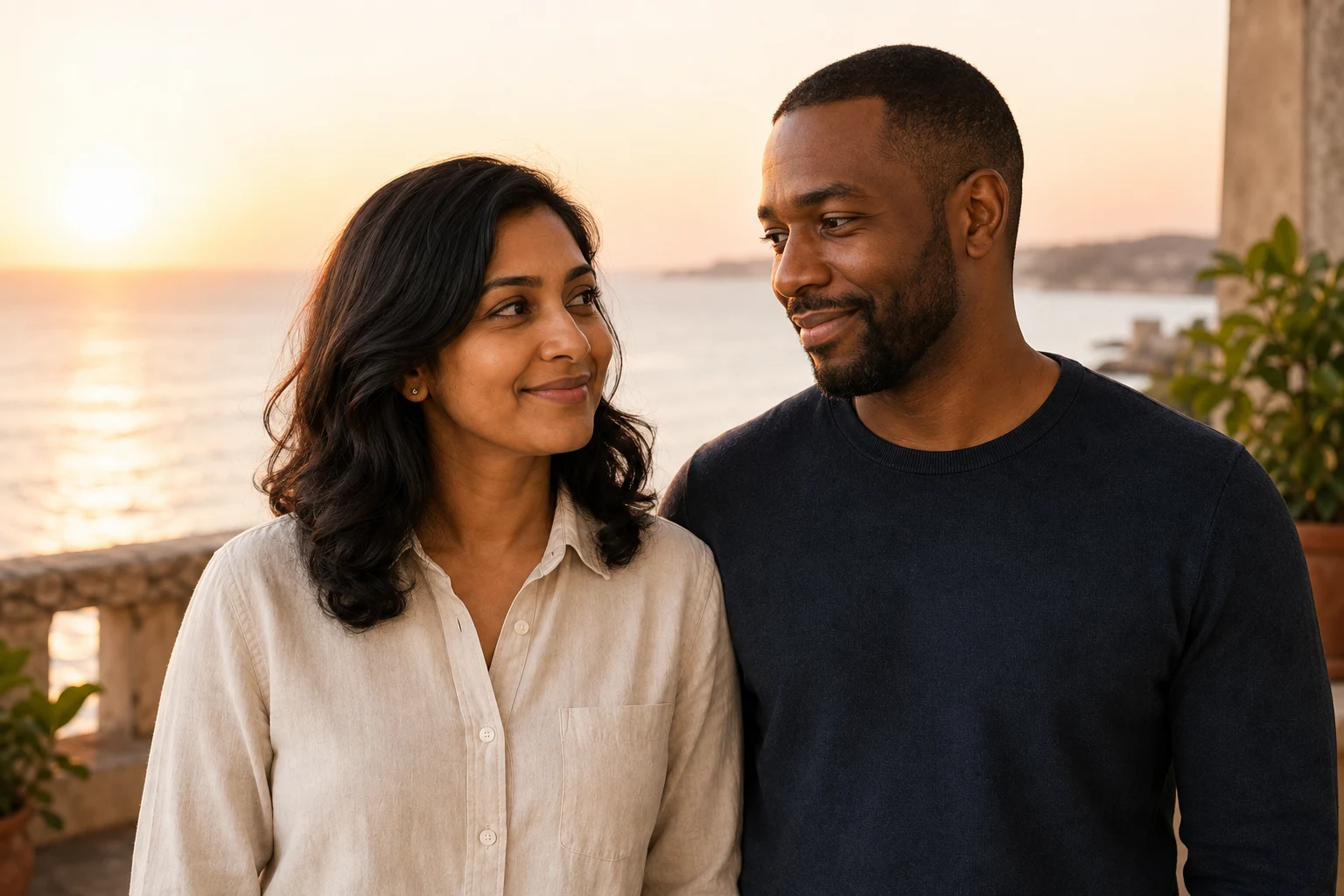
Use the reference image for both adult identities. Keep the woman on the left and the man on the right, with their distinct facial structure, skin tones, hair and apparent ages recognizable. Create a candid waist-up anniversary portrait on a quiet seaside terrace at sunset. They stand shoulder to shoulder and glance toward each other, smiling softly, with both faces visible in three-quarter view. The woman wears a cream linen shirt and the man a navy knit shirt. Warm backlight, gentle reflected fill on faces, ocean softly out of focus, 50mm photographic feel, natural skin texture. Keep hands below the crop. Landscape 3:2. Exactly two adults; no text, logos or extra people.
2. A black-and-white studio portrait
For a more restrained result, keep the original head direction and change only the photographic treatment and background. A straight-on pose is also useful for comparing facial details against the source.
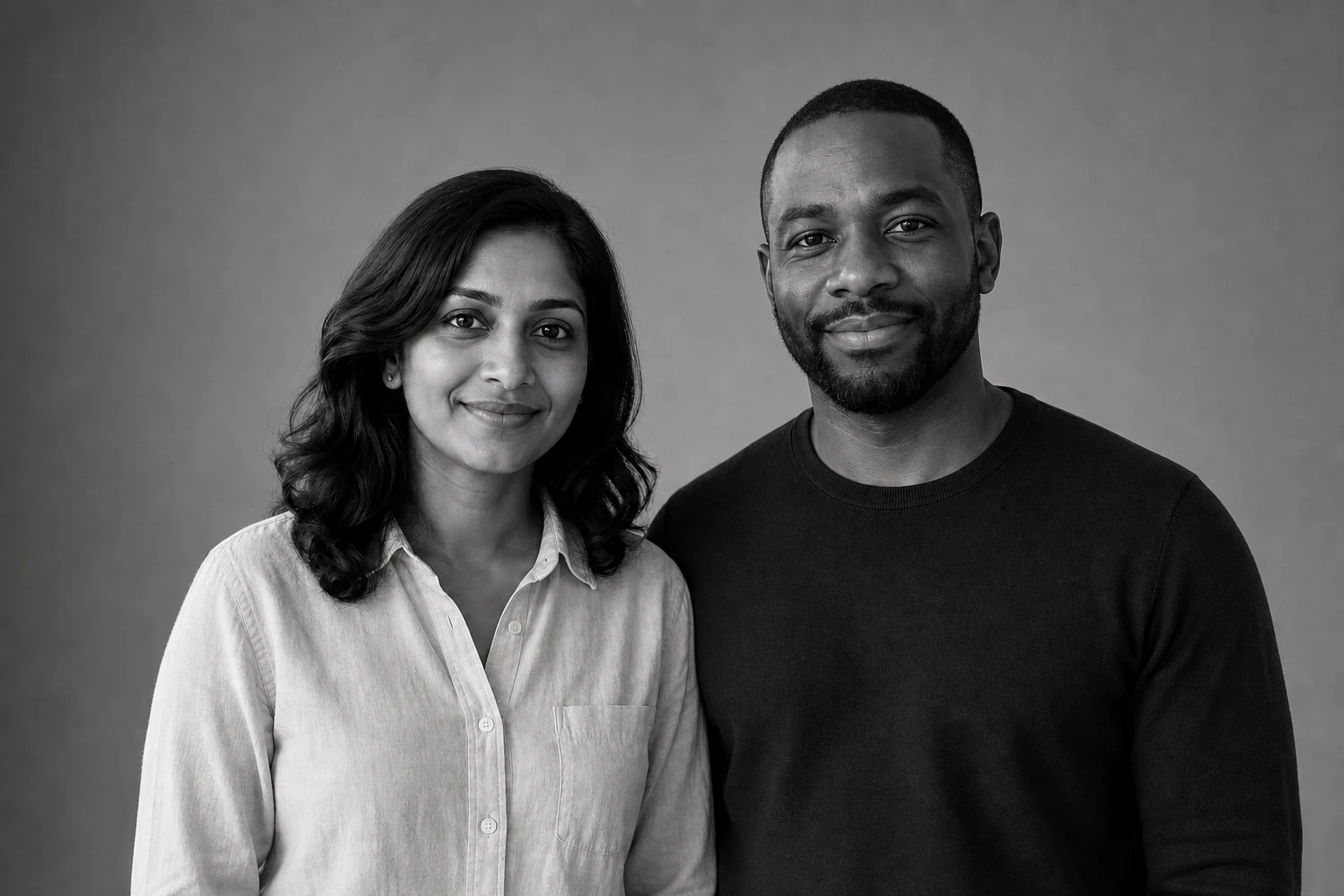
Use the reference image for both adult identities. Keep the woman on the left and the man on the right, with their distinct facial structure, skin tones, hair and apparent ages recognizable. Make a black-and-white studio anniversary portrait. They stand close, shoulders gently touching, and look toward the camera with relaxed expressions. Keep their cream linen and navy knit clothing. Plain mid-gray background, one large softbox camera-left with gentle fill, natural skin detail, waist-up 85mm portrait feel. Keep their heads separate rather than overlapping and hands below the crop. Landscape 3:2. Exactly two adults; no text, logos or heavy skin smoothing.
3. An autumn walk that looked too static
This prompt asked for a slow walk, but the result reads more like a standing portrait. The three-quarter crop does not show the feet, so it is difficult to tell whether either person is taking a step. The location and coats changed more clearly than the action.
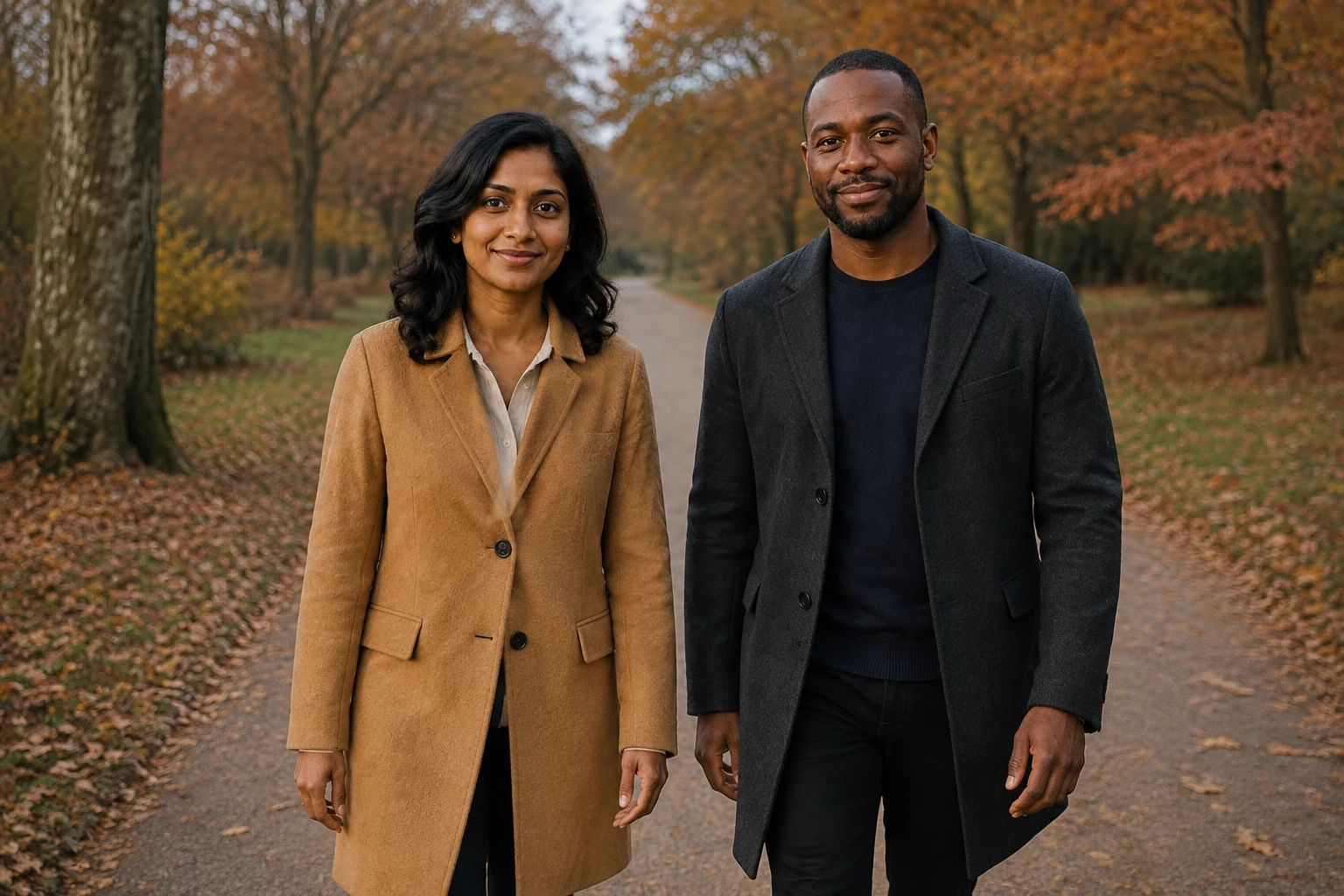
Use the reference image for both adult identities. Keep the woman on the left and the man on the right, with their distinct facial structure, skin tones, hair and apparent ages recognizable. Photograph them walking slowly together along a quiet autumn park path, heads turned slightly toward the camera, relaxed smiles, both faces unobstructed. Change the woman's outfit to a camel wool coat and the man's to a charcoal wool coat over his navy sweater. Their arms hang naturally at their sides without holding hands. Three-quarter-length 50mm photograph, level camera, soft overcast daylight, muted rust leaves, a simple path receding behind them. Landscape 3:2. Exactly two adults; no extra people, text or logos. Natural skin texture and believable body proportions.
4. A clearer walking beat, with a remaining limitation
The revision names an observable step and asks to include the shoes. We used the original reference again, not the previous output, to avoid carrying forward its new facial details.
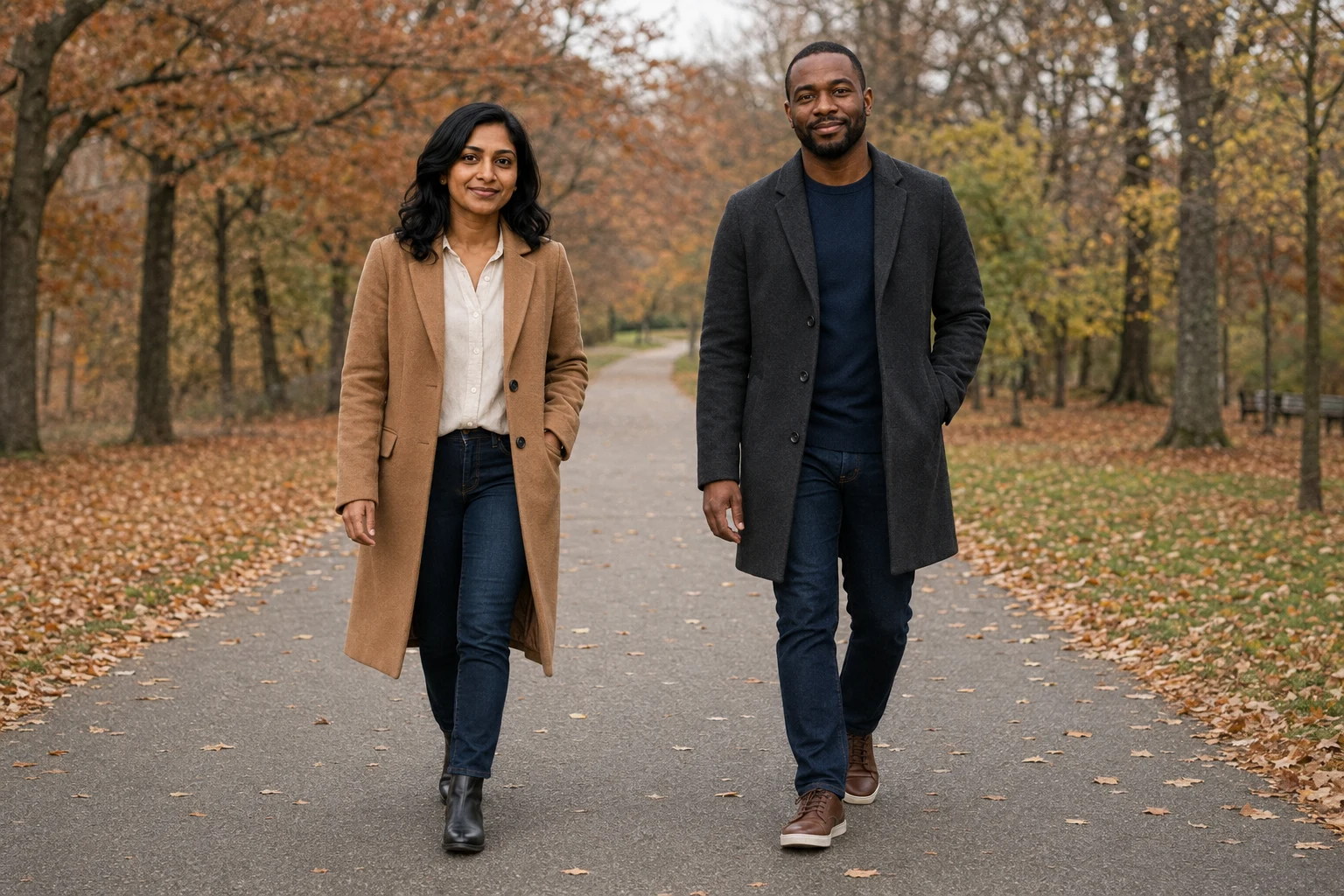
Use the reference image for both adult identities. Keep the woman on the left and the man on the right, with their distinct facial structure, skin tones, hair and apparent ages recognizable. Photograph them on a quiet autumn park path wearing a camel wool coat on the woman and a charcoal wool coat over a navy sweater on the man. Full-body photograph with both pairs of shoes visible and clear ground below them. Capture one observable walking beat: the woman steps forward with her right foot, the man steps forward with his left foot, slight natural opposite arm swing, both looking slightly toward camera with relaxed smiles. Keep their bodies separated, no holding hands. Level 50mm camera, soft overcast daylight, muted rust leaves and a simple path receding behind. Landscape 3:2. Exactly two adults; no extra people, text or logos. Natural skin texture and believable proportions.
Candid couple photo prompts for everyday moments
These four everyday scenes use the same couple reference as the portraits above. Adapt clothes, placement and pronouns to the consenting adults in your references. For multiple uploads, replace "uploaded photo" with your model's supported reference labels.
5. Window-seat conversation
An exchanged glance and a simple table setting create a more candid feeling than asking both people to smile at the camera.
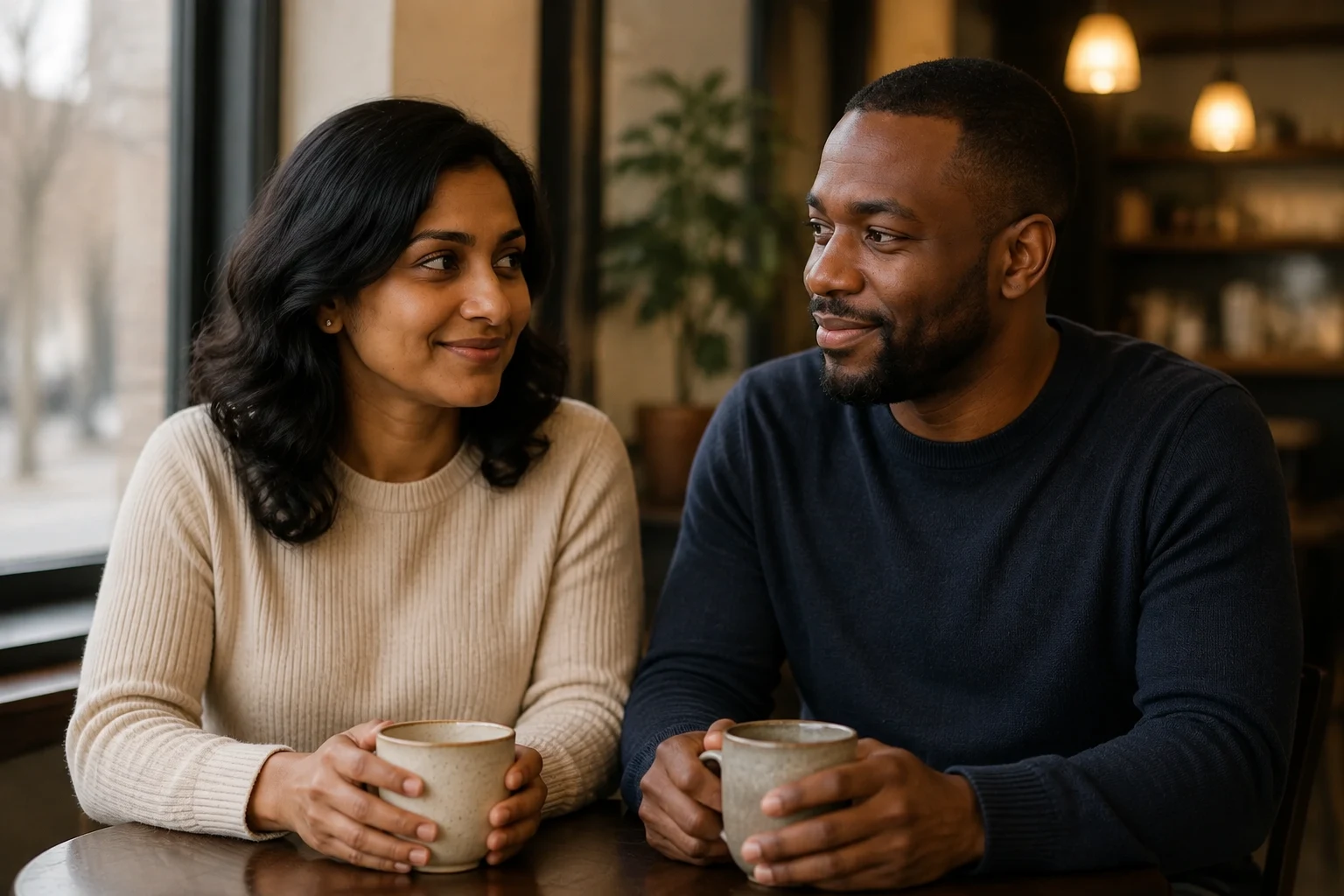
Use both adults from the uploaded photo, keeping their individual faces, skin tones, hairstyles and apparent ages recognizable. Seat them beside each other at a small cafe table near a window, shoulders angled slightly inward, sharing a relaxed conversation rather than looking directly at camera. Keep both faces unobstructed in three-quarter view. Simple unbranded knitwear, two ceramic cups resting on the table, soft overcast window light with warm background lamps, waist-up 50mm composition, realistic skin texture. Exactly two people; no readable signs or invented text. Keep the woman on the left and the man on the right. Landscape 3:2.
6. A rainy-day doorway
A doorway frames the couple without an umbrella hiding either face. Describe the wet street and reflected light rather than adding heavy rain across the subjects.
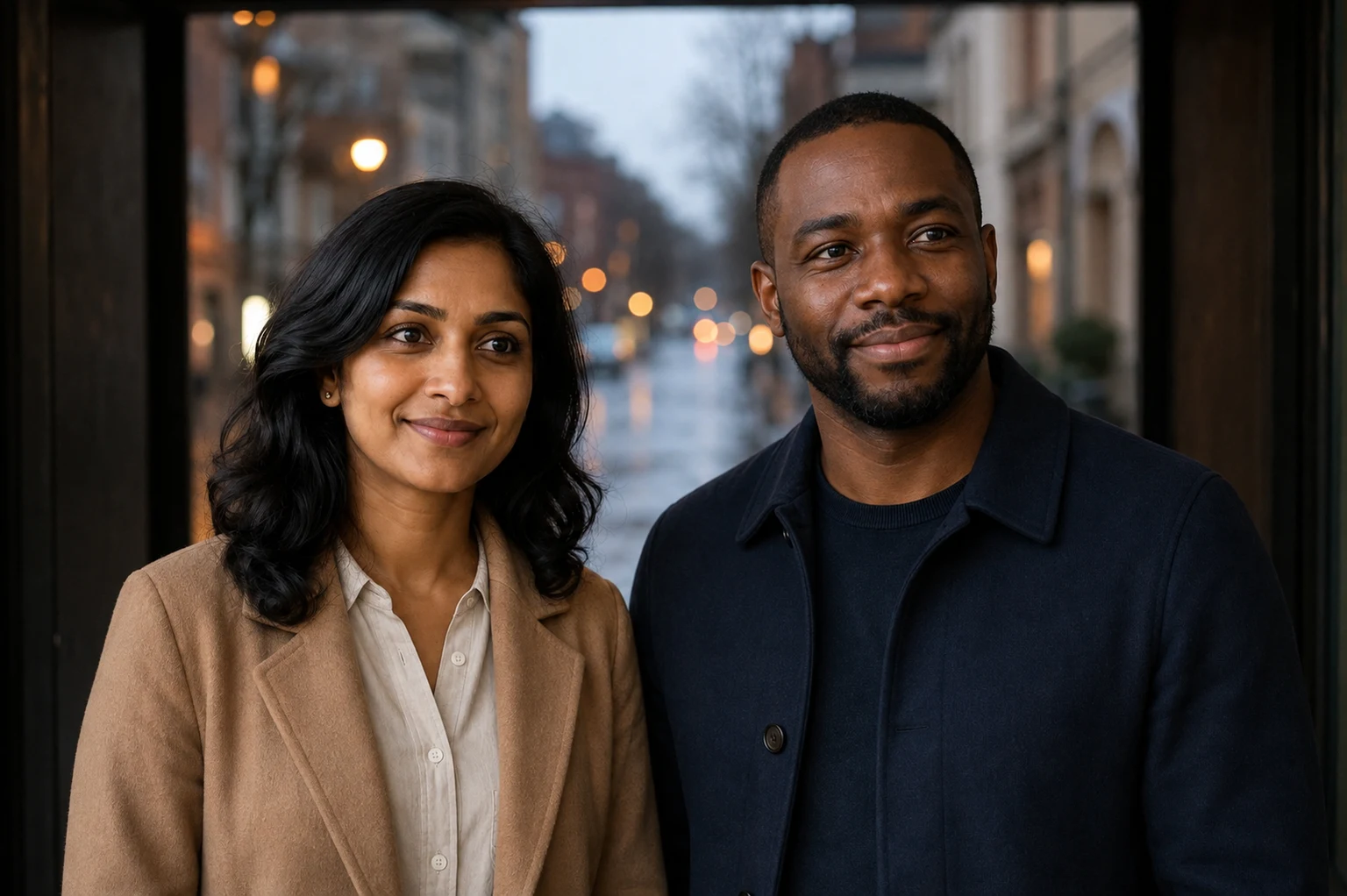
Create a candid portrait of the two adults in the uploaded reference standing under a broad doorway after rain. Keep each person's identity and relative height recognizable, with a small space between their faces. They look out toward the street, slightly turned so both eyes remain visible. Muted navy and camel coats, wet pavement softly reflecting distant lights, cool natural light on their faces and restrained warm background bokeh. Waist-up framing, 85mm photographic feel, natural expressions and skin texture. No umbrellas covering faces, extra people or text. Keep the woman on the left and the man on the right. Landscape 3:2.
7. Making breakfast together
Give each person a separate, visible task. A bread bag and a clear countertop keep the interaction easier to judge than several overlapping utensils or hands.
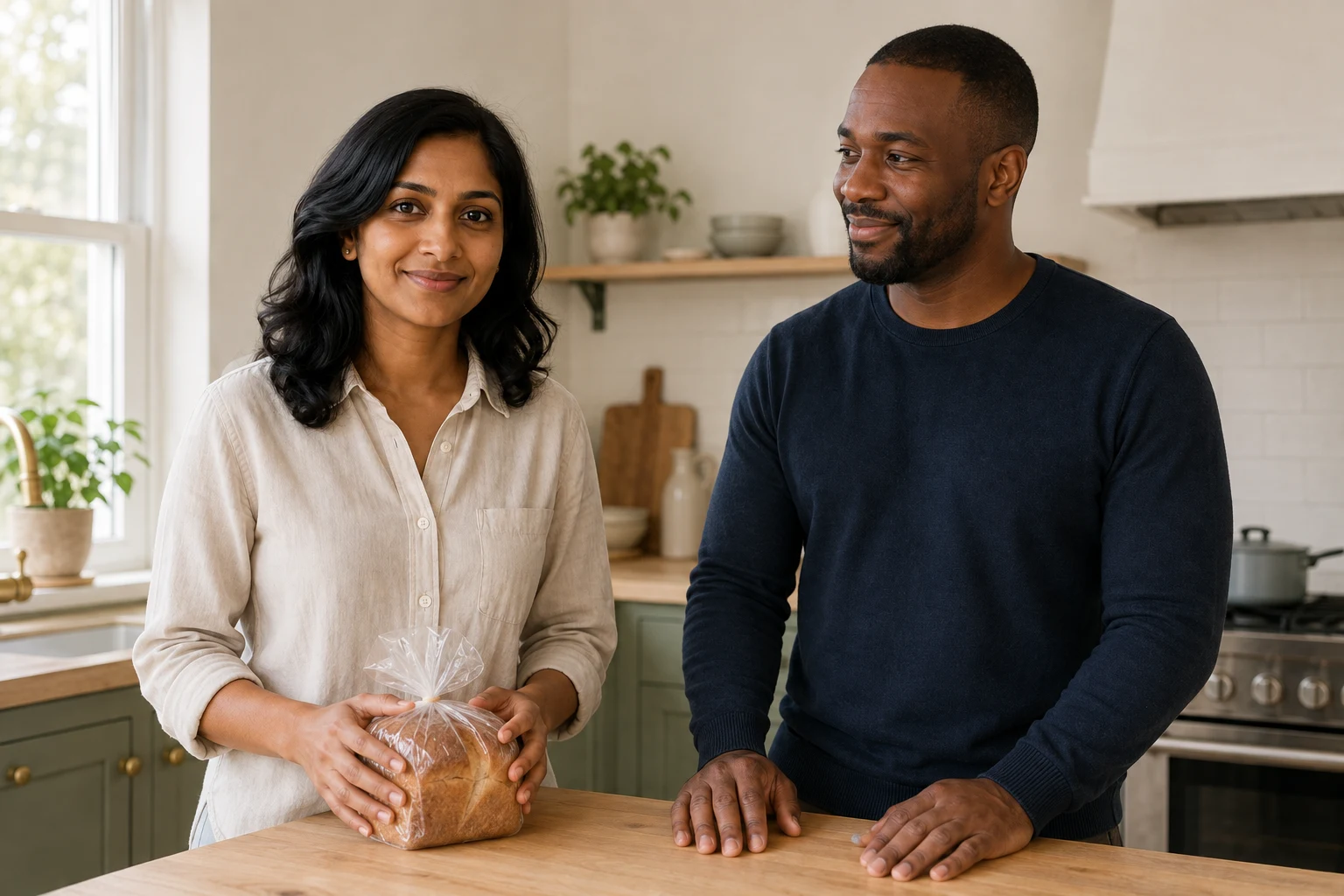
Place the two adults from the uploaded photo in a simple bright home kitchen. Preserve their separate facial features, hair, skin tones and apparent ages. One person stands beside the counter holding a closed bread bag while the other rests both hands on the counter and smiles toward them. Keep the hands visible and separate, with no overlapping fingers. Soft morning window light, cream and muted green palette, waist-up environmental photograph, relaxed cotton clothing, lived-in but uncluttered setting. Exactly two adults; no legible packaging or logos. Keep the woman on the left and the man on the right. Landscape 3:2.
8. Browsing a gallery
A shared point of interest lets the couple look in the same direction without a rigid camera-facing pose. Keep the gallery quiet so the two people remain the focus.
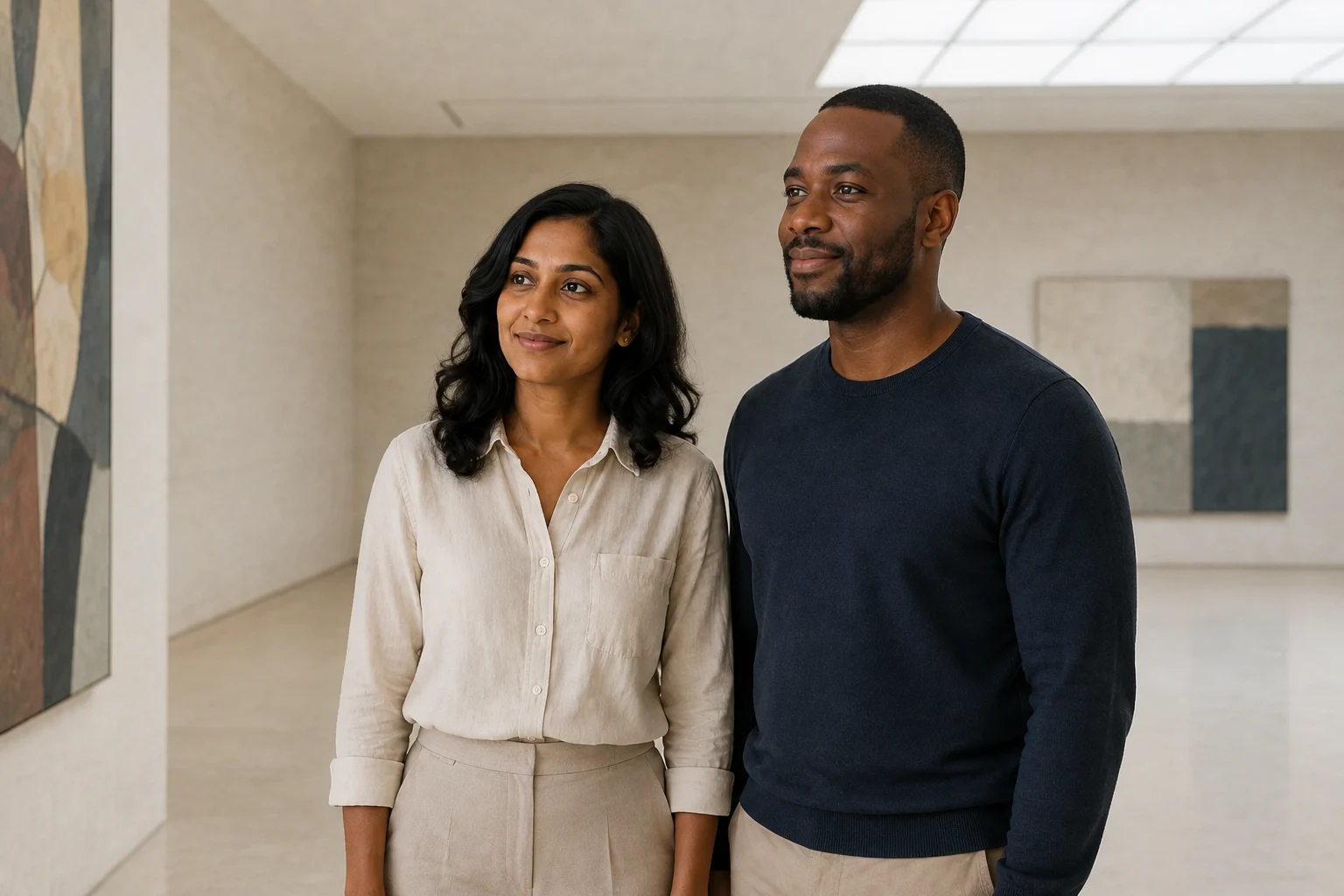
Use the two adults in the uploaded reference as the only subjects in a quiet contemporary gallery. Keep their faces and body proportions recognizable. They stand side by side with heads slightly turned toward an abstract painting beyond the left edge of the frame; show both faces in gentle three-quarter view. Simple tailored casual clothing, pale stone walls, broad skylight, restrained colors, medium-wide 50mm photograph. Keep their silhouettes separate and hands relaxed at their sides. No crowds, labels, readable text or additional people. Keep the woman on the left and the man on the right. Landscape 3:2.
Romantic and anniversary photo prompts
Prompts 9-16 below are additional ideas without published example outputs. Intimacy does not require complicated touching. An exchanged glance, close shoulders or a shared activity can communicate affection while leaving faces easy to evaluate.
9. A candlelit dinner portrait
Create an intimate anniversary photograph of the two adults from the uploaded photo seated next to each other at a small restaurant table. Preserve each face, age, skin tone and hairstyle. They turn slightly toward camera with relaxed smiles, shoulders close but faces not overlapping. A single candle stays below face level, with soft warm fill light so their eyes and skin remain clear. Dark neutral evening clothing, subtle background blur, waist-up 85mm framing and realistic skin texture. No other diners, readable menus or invented lettering.
10. Daylight formal portraits
Use the uploaded couple photo to create a formal portrait of the same two adults in a quiet daylight studio. Keep both identities and their relative height recognizable. Dress them in complementary ivory and charcoal formalwear appropriate to their preferences, without changing facial structure or age. They stand at a slight angle toward each other, looking at camera, hands resting separately by their sides. Warm gray backdrop, broad soft window light, full-length composition with shoes visible, restrained editorial finish. Exactly two adults; no extra jewelry, text or logos.
11. Coastal evening, without a dramatic pose
Photograph the two adults from the uploaded reference standing on a safe coastal path, retaining their individual faces, skin tones, hair and apparent ages. They lean their shoulders lightly together while looking toward camera. A gentle breeze moves loose fabric and hair without covering their eyes. Soft cream and navy layers, ocean in the distance, diffused late-afternoon light, waist-up 50mm image with natural color and texture. Keep both heads separate. No cliff-edge stunts, extra people, text or logos.
12. Celebrating years together
Create a warm anniversary portrait of the adult couple in the uploaded photo. Preserve their real apparent ages, individual facial structure, gray hair if present, skin texture and natural proportions; do not make them younger. Seat them side by side on a simple garden bench, shoulders close and both looking toward camera with gentle smiles. Soft open shade, muted foliage, waist-up 85mm framing and understated natural clothing. Keep hands separate and clearly visible. Exactly the two reference subjects; no text or decorative numbers.
Studio and travel-style couple prompts
13. Direct-flash city portrait
Use the two adults from the uploaded photo for a casual direct-flash portrait outside a plain city building at blue hour. Retain both faces, hairstyles, skin tones and apparent ages. They stand shoulder to shoulder and look straight at camera with relaxed expressions, wearing simple dark jackets. Mild on-camera flash, a cool softly blurred background, subtle grain and crisp natural skin detail. Waist-up 50mm composition, clean head separation. No recognizable bystanders, text, logos or extreme skin smoothing.
14. A calm mountain lodge
Create a travel-style portrait of the same two adults in the uploaded photo beside a large mountain-lodge window. Keep their faces and relative proportions recognizable. They stand close in simple wool sweaters, looking toward each other with both faces visible in three-quarter view. Distant mountains remain softly focused outside, with broad window light and gentle indoor fill. Medium 50mm framing, believable reflections, muted pine and cream colors, natural skin texture. Exactly two adults; no text or other guests.
15. A colorful studio, simple body language
Restyle the uploaded photo as a contemporary couple portrait against a matte terracotta studio background. Keep each adult's identity, skin tone, age and hairstyle recognizable. Retain their left-to-right order and give them complementary plain cream and dark brown outfits. They stand side by side, shoulders angled inward, eyes toward camera and hands below a waist-up crop. One broad softbox, subtle background shadow, 85mm portrait feel, realistic skin and fabric. Exactly two adults; no text, patterns or added people.
16. A relaxed portrait that fits your relationship
Create a relaxed portrait of the two consenting adults in the uploaded photo, preserving each person's facial structure, skin tone, hairstyle, apparent age and gender expression. Keep their preferred clothing and avoid adding stereotyped roles or changing body shapes. Show them sitting close together on a simple sofa, looking toward camera with natural smiles, faces unobstructed and hands resting separately on their own laps. Soft window light, warm neutral room, medium 50mm composition and realistic skin texture. Exactly the two reference subjects; no text or logos.
Fix identity and pose problems one at a time
| What you see | What to change next | What not to assume |
|---|---|---|
| Faces look swapped or blended | Return to the original reference; state left/right placement and keep heads apart | Repeating "exact face" guarantees a match |
| One person looks much larger | Ask for a similar camera distance and reference-relative height | Separate selfies have compatible perspective |
| Awkward touching or extra fingers | Separate hands, reduce contact, or use a waist-up crop | A negative prompt will solve every anatomy error |
| The couple looks posed rather than candid | Name one visible action and frame the body parts that show it | "Natural" or "walking" alone will produce the intended moment |
| Facial details drift after several edits | Restart from the original instead of repeatedly editing generated faces | A visually similar intermediate is an exact identity reference |
| The scene looks like a cutout | Ask for a single plausible light direction and matching shadows | The model will reconcile contradictory reference lighting |
Judge the result at full size. Compare both faces independently, then hands, proportions, gaze and contact. A beautiful background does not compensate for a face that no longer resembles the intended person. If a result is misleading, keep it private or discard it.
From prompt to a finished photo
- Choose the closest scenario rather than combining several prompts.
- Select Use this prompt to open Image Variations with the text filled in.
- Upload your reference and choose a model with the input support you need. Adjust the prompt's placement and clothing descriptions to match your photo.
- Review the available aspect ratios, generation count and displayed credit cost. The article's prompts are free to copy; model generation uses credits.
- Generate and compare against your source. Change one specific instruction if the first output misses the brief.
Need a wider composition? Use the AI image extender to explore additional background, then inspect the subject for changes. If you use a Gemini-family model, the Gemini photo prompt guide covers additional editing directions. An approved still can also become a starting frame in Image to Video; keep the first motion simple.
Frequently Asked Questions
What is a good AI couple photo prompt?
A useful prompt identifies both reference subjects, keeps their placement clear, describes one pose or interaction, and specifies the setting, light and framing. Start with a simple composition and add styling after checking both faces.
Can I use two separate photos?
Only when the selected model supports multiple reference images. Check the upload controls before choosing that workflow. Otherwise start with one joint photo; two unrelated portraits should not be silently treated as a supported input combination.
Will these prompts keep our faces exactly the same?
No prompt guarantees an exact match. Reference-based generation can alter facial details, expressions, proportions and age cues. Use a clear source, avoid extreme pose changes, inspect both people and reject misleading results.
Can I use these as Gemini couple photo prompts?
The scene directions are model-agnostic starting points. Adapt reference labels, aspect ratios and supported controls to the Gemini-family model you select. The illustrated checks in this article were not generated with Gemini, so they should not be read as Gemini performance examples.
Are the prompts and generated photos free?
You can read and copy all sixteen prompts without paying. Generating images in HighReach uses credits; the current cost depends on the selected model and settings and is shown before generation. Do not assume copying a prompt grants free generations.
Were all sixteen prompts tested?
Eight reference edits have published outputs and observations above, made with Codex's built-in OpenAI image tool. The remaining eight are suggested directions without published results. None is a guarantee of a particular result in HighReach.