Research-backed product profile
Last checked August 26, 2026
Pika review: fast AI video generation, transformations, and effects
Pika combines text-to-video and image-to-video with frames, scene building, additions, swaps, twists, effects, and audio-driven performance tools for short creative clips.

Best for
Creators making short stylized clips, transformations, and social effects
Learning curve
Low for effects; moderate for controlling longer or reference-driven clips
Platform
Web browser and API
Main trade-off
Short clips and effect-led workflows do not replace a complete editing or multi-scene production system
About Pika
What the product does and where it fits
Pika is built around playful, direct transformations rather than a traditional editor. Users can generate a clip from text or an image, connect frames, assemble scene ingredients, add or replace objects, transform a subject, or apply a packaged visual effect.
Pika 2.5 supports 480p, 720p, and 1080p depending on plan and feature. Most workflows create short clips, while Pikaframes can span longer frame-to-frame sequences and Pikaformance animates a face from supplied audio.
Credit cost is predictable on the public pricing page but changes significantly by tool and resolution. A five-second 1080p generation can cost several times more than a 480p draft, so a draft-first workflow is important.
Ideal users
Who is Pika best for?
The strongest use cases for Pika come from teams whose production needs match its most opinionated workflows.
Social creators
Create recognizable effects, transformations, and visual hooks quickly.
Concept teams
Test motion ideas from still images before a larger production.
Music and character creators
Animate faces and performances from supplied audio.
Experimenters
Add, swap, or transform elements without conventional compositing.
Capabilities
Top Pika features
These are the capabilities most likely to affect the buying decision and day-to-day creative workflow.
Text and image to video
Generates five- or ten-second clips with plan-dependent resolutions.
Pikaframes and Pikascenes
Connects visual states or combines scene ingredients into directed motion.
Pikadditions and Pikaswaps
Adds or replaces subjects and objects in supplied material.
Pikatwists and Pikaffects
Applies dramatic transformations and packaged short-form effects.
Pikaformance
Animates a face in sync with uploaded audio.
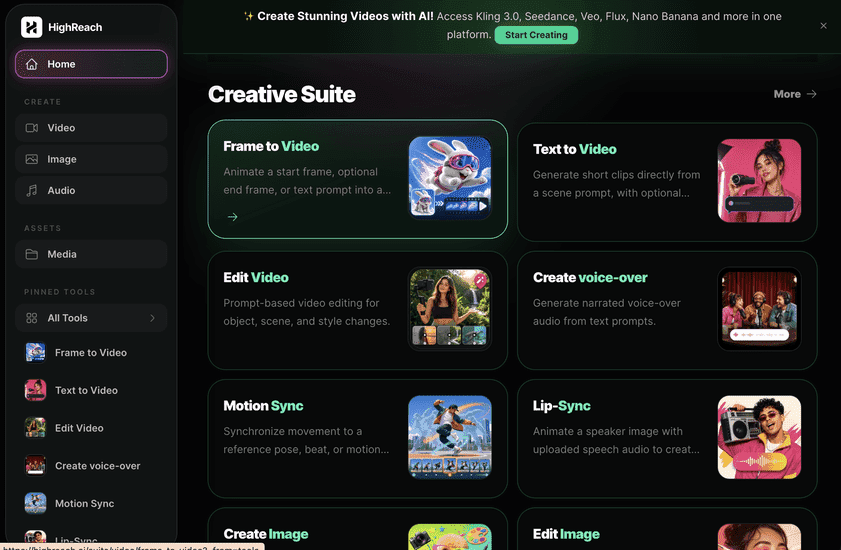
Create across leading video, image, and audio models in one studio
Pika offers a distinctive family of proprietary effects and transformation tools. HighReach emphasizes access to several leading video models plus image and audio generation. Choose Pika for its named effects; choose HighReach for broader model and media coverage.
Pricing
Pika pricing snapshot
Free; Standard $8, Pro $28, and Fancy $76 monthly when billed yearly. Compare included usage, exports, storage, collaboration, and AI limits rather than choosing on headline price alone.
Basic
$0
80 monthly credits, 480p Pika 2.5, selected tools, watermark-free downloads, and commercial use.
Standard
$8/mo
700 credits and all resolutions when billed yearly.
Pro
$28/mo
2,300 credits and faster generation when billed yearly.
Fancy
$76/mo
6,000 credits and fastest generation when billed yearly.
Pricing checked August 26, 2026. Promotions, annual discounts, regional pricing, taxes, credits, and plan limits can change.
Check current pricingTrade-offs
Pika pros and cons
The practical strengths and limitations to consider before adopting the product for a recurring workflow.
Pros
- Approachable effect-led workflows
- Transparent per-feature credit table
- Useful object and character transformations
- Commercial use and watermark-free downloads are available on Basic
Cons
- Best suited to short clips
- Higher resolutions consume credits quickly
- Effect consistency varies by source material
- Full sequencing and finishing still require another editor
Verdict
Is Pika worth it?
Pika remains one of the easiest ways to create transformation-heavy short clips. Its public credit table is a strength, but users should test the exact feature and resolution that matters before choosing a plan.
FAQ
Pika frequently asked questions
Short answers to the questions buyers commonly ask before choosing a creative software platform.
What is Pika?
Pika combines text-to-video and image-to-video with frames, scene building, additions, swaps, twists, effects, and audio-driven performance tools for short creative clips.
Is Pika free to use?
Yes, with 80 monthly credits and limited 480p Pika 2.5 access. Free-plan limits and availability can change, so confirm the current allowance on Pika's official pricing page before beginning a production workflow.
How much does Pika cost?
Free; Standard $8, Pro $28, and Fancy $76 monthly when billed yearly. Prices, promotions, included credits, and regional taxes can change. The pricing snapshot on this page was checked on August 26, 2026.
Who is Pika best for?
Pika is best for creators making short stylized clips, transformations, and social effects. Its strongest fit depends on whether that focused workflow matters more than having broad generative image, video, and audio tools in one studio.
What is the main disadvantage of Pika?
Short clips and effect-led workflows do not replace a complete editing or multi-scene production system
How is Pika different from HighReach?
Pika offers a distinctive family of proprietary effects and transformation tools. HighReach emphasizes access to several leading video models plus image and audio generation. Choose Pika for its named effects; choose HighReach for broader model and media coverage.
Research notes
Sources and disclosure
HighReach is not affiliated with Pika. Product names and trademarks belong to their owners. We checked official product and pricing documentation on August 26, 2026, kept factual claims separate from our assessment, and linked the sources below. Features and prices can change after that date.