✨ Create Stunning Videos with AI!Access Kling 3.0, Seedance, Veo, Flux, Nano Banana and more in one platform. Start Creating
Post-trained by fal Research
MiniMax H3 Max, quality at the speed of iteration.
Generate H3 Max video from a written shot or an opening image. Move from prompt to a synchronized 5-15 second clip at 480P or 768P with stronger instruction following and a fal-published render time faster than the video itself.
Post-trained by fal5-15 seconds480P and 768PNative synchronized audio
HighReach video suiteMiniMax H3 Max
Prompt direction
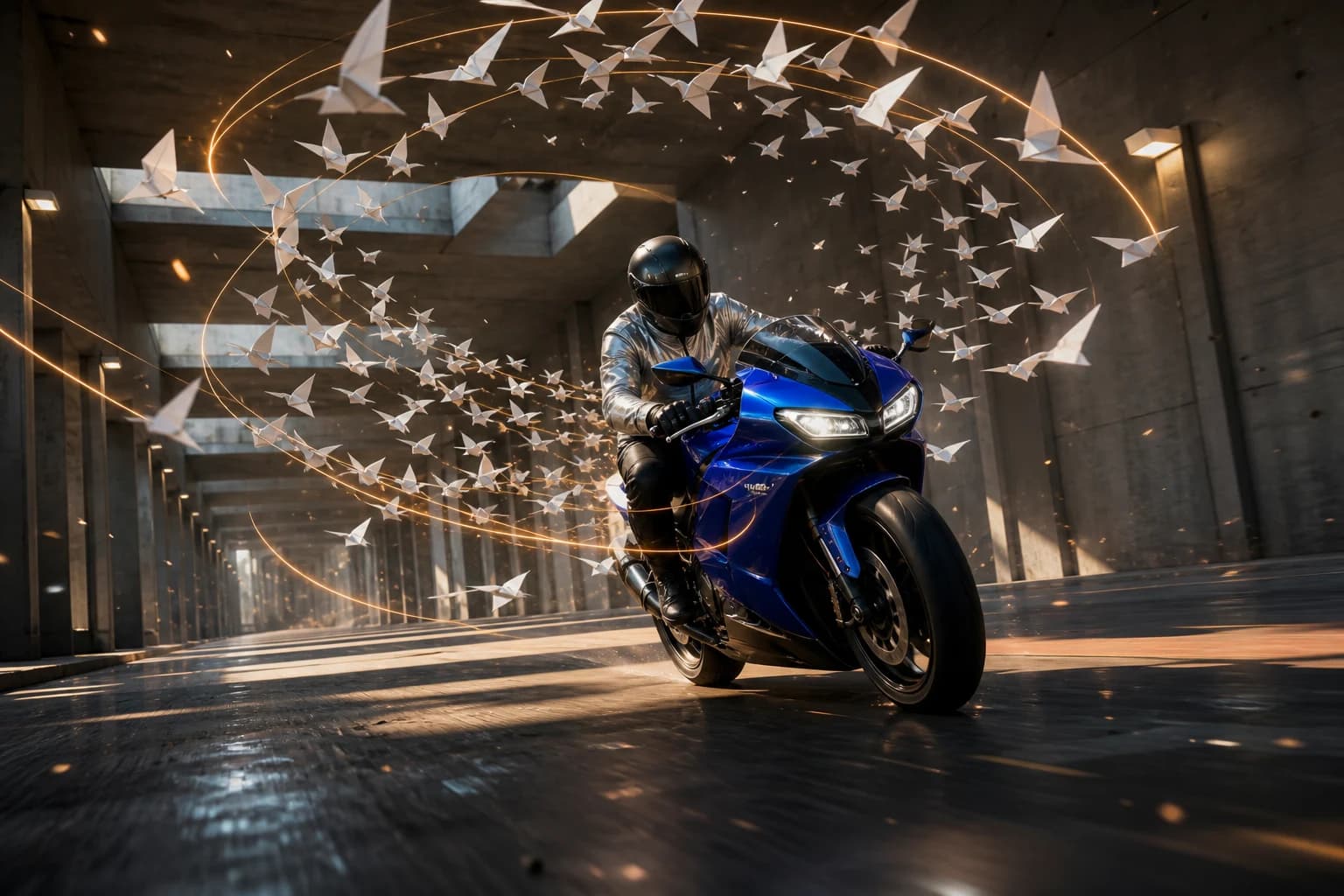
One low tracking shot follows a cobalt motorcycle through a concrete tunnel. White paper birds spiral in an exact clockwise helix, amber light maps the camera path, and engine tone, wing flutter, and tunnel reflections stay synchronized.
BriefGenerateReview
Built from
MiniMax H3 open weights
Published fal latency
Under 3s for a 5s clip
Generation modes
Text and image to video
Source-video tools
Relight, recast, and extend
HighReach output
480P or 768P at 24fps
What is MiniMax H3 Max?
A fal-built H3 variant that improves the quality, speed, and cost frontier together.
H3 Max is not simply a larger official MiniMax plan. fal Research continued training MiniMax H3's open weights and paired the resulting model with an inference stack designed around it.
01
fal says its post-training introduced substantial new data with an emphasis on prompt adherence and visual quality. The goal was to improve how accurately a shot follows ordered direction while preserving H3's unified video and native-audio foundation.
02
The inference engine was developed alongside the model rather than optimized afterward. fal reports that a five-second 768P generation completes in roughly three seconds, about 35 times the throughput of its standard H3 endpoint under the company's launch evaluation.
03
The quality claims are not limited to fal's internal comparisons. At the time of this page's research, H3 Max also appeared at or near the top of public image-to-video-with-audio preference boards. Rankings change as votes and competing models accumulate, so use them as evidence, not a permanent guarantee.
MiniMax H3 Max capabilities
Direct the shot with more than a one-line prompt.
Use MiniMax H3 Max as part of a complete AI video workflow in HighReach, from the first reference frame to final output review.
01
Instruction fidelity
Keep complex shot direction in the order you wrote it.
H3 Max was post-trained specifically around prompt understanding and aesthetics. Write chronological action, camera, lighting, and sound beats instead of relying on a short mood phrase.
02
Faster-than-real-time iteration
Judge motion while the creative decision is still fresh.
fal publishes an under-three-second latency for a five-second 768P clip. That changes H3 Max from a model you wait on into a practical prompt-testing and shot-exploration loop.
03
Unified audiovisual output
Generate dialogue, ambience, effects, and picture together.
H3 Max retains H3's natively synchronized audio-video generation. Describe speech, room tone, foley, music, and intentional silence in the same chronological brief as the visible action.
Connected production
Brief, generate, compare, and refine without losing the creative thread.
How it works
Use speed to resolve the shot before adding production cost.
H3 Max is strongest as a rapid creation and decision layer. Establish prompt, camera, motion, and sound at 480P or 768P, then keep the result or move to standard H3 when the project requires higher resolution or richer references.
01
Choose text or frame mode
Start from text for open exploration, or upload an image when subject appearance and composition are already decided.
02
Write the shot chronologically
Describe the opening state, ordered actions, camera path, lighting change, sound events, and final frame in sequence.
03
Choose prompt expansion effort
Use Balanced for fast everyday iteration, Disabled for exact wording, or Quality when a richer rewrite is worth additional preparation time.
04
Review or hand off to H3
Keep H3 Max when 768P is sufficient. Switch to standard H3 when you need 2K, 4K, video references, audio references, or localized editing.
H3 Max workflows for new shots and existing footage.
Text and image generation create a new 5-15 second clip with synchronized audio. Relight, Recast, and Extend start from a video you upload, and each has its own source-length limits.
Create the complete shot
H3 Max Text to Video
01
Generate an original scene from written direction with six aspect ratios, selectable prompt expansion, and native audio.
21:9, 16:9, 4:3, 1:1, 3:4, and 9:16
480P or 768P output
Disabled, Balanced, or Quality prompt expansion
Animate a visual anchor
H3 Max Image to Video
02
Use a starting image as the source of truth and optionally add an end frame to control where the action resolves.
Required start frame in HighReach
Optional end-frame control
Output follows the source image composition
Change the lighting
H3 Max Relight
03
Relight an uploaded clip from a lighting preset while keeping its subjects, motion, and camera. Each preset sends a lighting-sphere render that shows the target light.
Swap the main people in a clip for new characters from one to four photos, applied left to right in every shot where they appear. The source soundtrack is kept.
Add 1-15 seconds of new footage after a clip and return the source plus the continuation as one video. H3 Max Turbo Extend offers the same workflow at a lower rate.
A useful prompt behaves like a compact director's brief. Give every detail a job instead of stacking visual adjectives.
Write visible action, camera behavior, and sound as separate chronological layers.
Use Balanced prompt expansion for fast iteration; choose Quality only when a deeper rewrite justifies extra preparation time.
For image-to-video, describe movement and invariants instead of repeating everything already visible in the source frame.
Test composition and timing at 480P, then use 768P for the selected direction.
Ordered action
01
Give every beat a clear place in time
0-2s: low tracking shot beside a cobalt motorcycle entering a concrete tunnel. 2-4s: white paper birds rise in one clockwise spiral without touching the rider. 4-6s: the camera pulls ahead and the rider crosses one amber light shaft. Preserve bike geometry and one continuous camera path.
Dialogue and sound
02
Direct the soundtrack with the picture
Close handheld shot in a quiet workshop. The designer looks up and says, ‘Run it once more.’ Her lips stay synchronized and her voice is calm, close, and natural. Add a soft ventilation hum, one metal tool settling on the table, and no background music.
First and last frame
03
Describe the transition, not the source images
Begin exactly from the uploaded wide product frame. The camera makes one smooth 35-degree clockwise arc as condensation forms and the key light warms from neutral to amber. End exactly on the supplied close label frame. Keep bottle shape, label text, cap, and background architecture stable.
Choose the right model
Compare MiniMax H3 Max with other video models.
No single model is best for every brief. Compare the controls, cost and results that matter for your production workflow.
H3 Max tops out at 768P. Use standard MiniMax H3 in HighReach when 2K or 4K output is required.
Check 02
H3 Max text and image generation does not take video or audio references; use H3 Max Reference for reference-led generation.
Check 03
Relight, Recast, and Extend each work on an uploaded clip. Relight accepts sources up to 15 seconds, Recast needs 5-30 seconds with no single shot over 15 seconds, and Extend accepts 1.6-60 seconds.
Check 04
For Relight, 1080P and 2K are upscaled and refined from 768P rather than generated natively.
Check 05
fal's latency and internal preference results are published provider measurements; actual queue time and independent leaderboard position can change.
Check 06
Quality prompt expansion may spend up to roughly 30 seconds rewriting the brief before video inference begins.
MiniMax H3 Max FAQ
Questions before you generate.
Practical answers about MiniMax H3 Max, available HighReach workflows, output controls, and prompt direction.
01What is MiniMax H3 Max?
MiniMax H3 Max is a post-trained AI video model developed by fal Research from MiniMax H3's open weights. It focuses on stronger prompt adherence, visual quality, fast inference, and synchronized native audio.
02Is H3 Max made by MiniMax or fal?
MiniMax created the base H3 model and released its weights. fal Research used those weights for additional post-training and built the H3 Max variant and optimized inference stack. It is therefore a fal-developed variant of MiniMax H3, not a separate official MiniMax tier.
03How is H3 Max different from MiniMax H3?
H3 Max is optimized for faster 480P and 768P text-to-video or image-to-video generation with improved prompt adherence. Standard H3 is the better HighReach choice when you need 2K or 4K output, image, video, and audio references, or reference-led editing.
04How fast is H3 Max?
fal reports that H3 Max can generate a five-second 768P video in roughly three seconds under its published launch evaluation. End-to-end time can still vary with prompt expansion, queue conditions, duration, and delivery.
05What duration and resolution does H3 Max support?
HighReach exposes 5-15 second H3 Max clips at 480P or 768P. Text to Video supports six landscape, square, and portrait aspect ratios; Image to Video follows the uploaded image's composition.
06Does H3 Max generate audio?
Yes. H3 Max generates synchronized native audio with the video, including dialogue, ambience, sound effects, and music described in the prompt. The provider endpoint always includes audio rather than exposing a separate audio toggle.
07Can H3 Max use a first and last frame?
Yes. The H3 Max image workflow accepts an opening image and an optional end image, allowing you to define both the starting composition and the destination of the motion.
08How much does H3 Max cost?
fal's documented non-promotional list rates are $0.05 per generated second at 480P and $0.08 per second at 768P. HighReach bills in credits and displays the final generation cost before you run the model.
09Can H3 Max relight, recast, or extend an existing video?
Yes. In HighReach, Relight Video applies a lighting preset to a clip of up to 15 seconds, Replace Character recasts one to four people from reference photos, and Extend Video adds 1-15 seconds of new footage and returns the full extended video.
10How much do H3 Max Relight, Recast, and Extend cost?
fal's list rates are: Relight $0.05, $0.08, $0.16, or $0.32 per output second at 480P, 768P, 1080P, or 2K; Recast $0.30 per output second at 768P or $0.45 at 1080P; Extend $0.05, $0.08, $0.16, or $0.32 per generated second, and Turbo Extend $0.025, $0.04, $0.08, or $0.16. For a 5-second job, HighReach charges 800 credits for Relight at 768P, 3,751 for Recast at 1080P, 667 for Extend at 768P, and 400 for Turbo Extend at 768P.
11Can I generate H3 Max video in HighReach?
Yes. Select MiniMax H3 Max in HighReach Text to Video or Image to Video. Choose duration, resolution, prompt expansion, and safety settings, then generate and review the result with your other media.
MiniMax H3 Max in HighReach
Resolve the shot at the speed of the idea.
Create prompt-faithful H3 Max video from text or an opening image, with synchronized sound and a fast path from first direction to final selection.
 01
01