Research-backed product profile
Last checked August 6, 2026
Runway review: professional generative video and AI editing
Runway combines its own frontier video models with image, audio, performance transfer, visual effects, editing tools, storage, and selected third-party models in a professional browser workspace.

Best for
Filmmakers, studios, artists, and teams producing cinematic AI video
Learning curve
Moderate to high for professional control
Platform
Web, iOS, Android, and developer API
Main trade-off
High-quality iteration can consume substantial credits
About Runway
What the product does and where it fits
Runway is one of the most established AI video platforms and remains strongly associated with cinematic generation and visual effects. Its workspace spans text-to-video, image-to-video, references, performance transfer, generative audio, image tools, upscaling, and project-based asset management.
The product offers meaningful creative control, but good results still require detailed prompts, reference preparation, multiple attempts, and credit awareness. It is closer to an AI-native production environment than a one-click social-video assembler.
Ideal users
Who is Runway best for?
The strongest use cases for Runway come from teams whose production needs match its most opinionated workflows.
Filmmakers
Prototype shots, effects, transitions, and performance-driven scenes.
Creative studios
Manage assets and collaborate around generative production.
Visual artists
Combine image references, motion, style, and experimental effects.
Developers
Integrate selected models and workflows through Runway's API.
Capabilities
Top Runway features
These are the capabilities most likely to affect the buying decision and day-to-day creative workflow.
Generative video
Includes Runway models such as Gen-4.5 and access to selected external models.
Image generation
Supports text, references, transformations, and image apps.
Performance tools
Transfers facial and body performance into generated characters.
AI visual effects
Combines live action, generated elements, edits, and transformations.
Generative audio
Adds text to speech, voices, lip sync, and audio apps.
Project workspace
Stores assets, editor projects, voices, and team output.
Create across leading video, image, and audio models in one studio
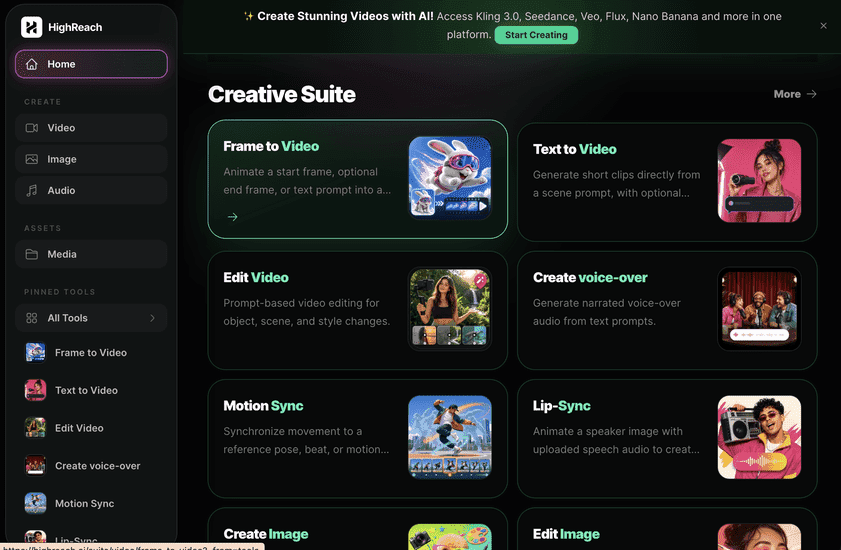
Runway has a mature production environment centered on filmmaking and its own research models. HighReach offers a more tool-oriented multi-model suite spanning image, video, and audio generation and transformation. Runway suits deep cinematic work; HighReach suits direct access to many specialized workflows in one consistent interface.
Pricing
Runway pricing snapshot
Free; Standard $15; Pro $35; Max $95 monthly list price. Compare included usage, exports, storage, collaboration, and AI limits rather than choosing on headline price alone.
Free
$0
125 one-time credits, selected models, three editor projects, and 5 GB storage.
Standard
$15/mo
625 monthly credits, all models, 4K upscaling, and no watermarks.
Pro
$35/mo
2,250 credits, custom voices, audio tools, and 500 GB storage.
Max
$95/mo
9,500 credits, one-month rollover, first access, and highest generation volume.
Enterprise
Custom
Custom credits, SSO, analytics, team spaces, onboarding, and priority support.
Pricing checked August 6, 2026. Promotions, annual discounts, regional pricing, taxes, credits, and plan limits can change.
Check current pricingTrade-offs
Runway pros and cons
The practical strengths and limitations to consider before adopting the product for a recurring workflow.
Pros
- Strong cinematic model quality
- Mature professional creative tooling
- Useful performance and VFX workflows
- Broad workspace and API ecosystem
Cons
- Iteration can be expensive
- Results require prompt and reference skill
- Fast action and continuity can still fail
- Credit comparison across models is complex
User feedback
What G2 and independent testing reviews say
Professional users value Runway's model quality, camera control, performance tools, and breadth. Recurring cautions across public reviews concern generation cost, failed attempts, output inconsistency, queue behavior, and support or refund expectations.
G2 and independent testing
Read reviews
Open review sourceCommon praise
- Cinematic control
- Strong VFX and performance tools
- Professional ecosystem
Recurring cautions
- Budget for iteration
- Test fast motion and continuity carefully
Review scores and counts are snapshots and may change. Themes are summarized rather than quoted to avoid overstating any single review.
Verdict
Is Runway worth it?
Runway remains a serious choice for AI-native filmmaking and visual effects. It rewards experienced creative direction, but teams should estimate the cost of failed and iterative generations rather than judging a plan only by its headline credit count.
FAQ
Runway frequently asked questions
Short answers to the questions buyers commonly ask before choosing a creative software platform.
What is Runway?
Runway combines its own frontier video models with image, audio, performance transfer, visual effects, editing tools, storage, and selected third-party models in a professional browser workspace.
Is Runway free to use?
Yes, with 125 one-time credits and limited models. Free-plan limits and availability can change, so confirm the current allowance on Runway's official pricing page before beginning a production workflow.
How much does Runway cost?
Free; Standard $15; Pro $35; Max $95 monthly list price. Prices, promotions, included credits, and regional taxes can change. The pricing snapshot on this page was checked on August 6, 2026.
Who is Runway best for?
Runway is best for filmmakers, studios, artists, and teams producing cinematic ai video. Its strongest fit depends on whether that focused workflow matters more than having broad generative image, video, and audio tools in one studio.
What is the main disadvantage of Runway?
High-quality iteration can consume substantial credits
How is Runway different from HighReach?
Runway has a mature production environment centered on filmmaking and its own research models. HighReach offers a more tool-oriented multi-model suite spanning image, video, and audio generation and transformation. Runway suits deep cinematic work; HighReach suits direct access to many specialized workflows in one consistent interface.
Research notes
Sources and disclosure
HighReach is not affiliated with Runway. Product names and trademarks belong to their owners. We checked official product and pricing documentation on , kept factual claims separate from our assessment, and linked the sources below. Features and prices can change after that date.