Nikhil
The best AI image generator in 2026 is GPT Image 2 for most people. In our side-by-side test, it was the most consistent model across product photography, exact text, graphic design, and a complicated scene with several spatial instructions.
That does not make it the best choice for every job.
Nano Banana 2 came remarkably close while emphasizing fast iteration. Grok Imagine followed the most difficult scene prompt especially well. Seedream 5.0 Pro produced polished marketing visuals, Ideogram 4 and Recraft V4.1 handled design work cleanly, and Krea 2 Large created one of the most striking product images in the test.
We did not rank these models from vendor demos or benchmark claims. We generated 27 new images using three identical prompts, kept the first result from every model, and published the complete comparison below.
The best AI image generators in 2026 at a glance
| AI image generator | Best for | Our test verdict |
|---|---|---|
| GPT Image 2 | Best overall | The most complete result across all three prompts |
| Nano Banana 2 | Fast, dependable iteration | Excellent text, composition, and prompt adherence |
| Grok Imagine | Complex prompts | The clearest spatial compliance in the robot scene |
| Seedream 5.0 Pro | Marketing and editorial visuals | Polished posters and convincing materials |
| Ideogram 4 | Typography and graphic layouts | Accurate text with disciplined, minimal design |
| FLUX.2 Pro | Controlled commercial generation | Reliable composition and highly usable outputs |
| Krea 2 Large | Aesthetic exploration | The most energetic product shot, with looser instruction following |
| Recraft V4.1 | Clean brand graphics | Strong poster design, less convincing product framing |
| Qwen Image 2.0 Pro | Text-heavy and multilingual workflows | Correct text, but weaker spatial discipline in our complex test |
Quick recommendations
- Best overall: GPT Image 2
- Best fast alternative: Nano Banana 2
- Best for a complex composition: Grok Imagine
- Best for polished marketing visuals: Seedream 5.0 Pro
- Best for text inside images: Ideogram 4
- Best for controlled commercial assets: FLUX.2 Pro
- Best for style exploration: Krea 2 Large
- Best for clean brand graphics: Recraft V4.1
- Best alternative for multilingual text: Qwen Image 2.0 Pro
How we tested these AI image generators
Most image-generator comparisons have a simple problem: every product is shown with a different prompt, a hand-picked result, or an example supplied by the company. That can show what a model is capable of, but it does not make comparison easy.
We used three prompts designed around common production needs:
- Product photography: one labeled perfume bottle, specific materials, condensation, and two-color rim lighting.
- Typography and design: a Bali travel poster with two exact lines of text and a constrained visual layout.
- Complex prompt following: two color-coded robots in fixed left-right positions, one chessboard, one yellow mug, and a rainy Tokyo background.
Every model generated one square image from each prompt. We used high-quality or standard production settings where the endpoint exposed them, but did not add a model-specific style prompt. The models were:
- GPT Image 2
- Nano Banana 2
- Seedream 5.0 Pro
- FLUX.2 Pro
- Ideogram 4
- Recraft V4.1
- Grok Imagine
- Qwen Image 2.0 Pro
- Krea 2 Large
We evaluated four things: visual quality, prompt adherence, text accuracy, and immediate production usefulness.
This is a practical editorial test, not a scientific benchmark. A single generation cannot measure a model's full range, repeatability, editing quality, reference-image consistency, or performance after several rounds of prompting. Randomness also means your first result may differ from ours.
The exact prompts
Prompt 1: product photography
Square commercial product photograph of one matte-black glass perfume bottle centered on a low slab of dark volcanic stone. The bottle has a rectangular body with rounded shoulders, a cylindrical black cap, and a small cream label reading exactly “NOCTURNE” with “EAU DE PARFUM” directly below it. Warm golden rim light from the left, cool blue edge light from the right, fine condensation droplets on the bottle, soft charcoal studio background, realistic glass reflections, shallow depth of field, premium fragrance campaign. No people, no extra bottles, no extra text. 1:1 composition.
Prompt 2: typography and poster design
Square graphic travel poster for Bali. Exact visible headline at the top: “ESCAPE TO BALI”. Exact smaller line at the bottom: “SUMMER 2026”. A single turquoise wave curves around a small green island with one temple silhouette, with a coral-orange sun behind it. Bold modern editorial layout, cream background, teal, coral, and deep navy palette, crisp typography, generous negative space. No logos, no mockup, no additional words. 1:1 composition.
Prompt 3: complex spatial instructions
Square cinematic illustration viewed straight-on. A glossy red toy robot sits on the left side of a small wooden table, and a glossy blue toy robot sits on the right. They are playing chess on one board between them. Exactly one yellow ceramic mug stands behind the board. Through one large window in the background, rainy Tokyo at night with pink neon reflections. Both robots must be fully visible, with the correct left-right colors and five fingers on each hand. No humans, no extra robots, no extra mugs, no text. Balanced symmetrical composition. 1:1 composition.
Test 1: Which AI image generator made the best product photo?
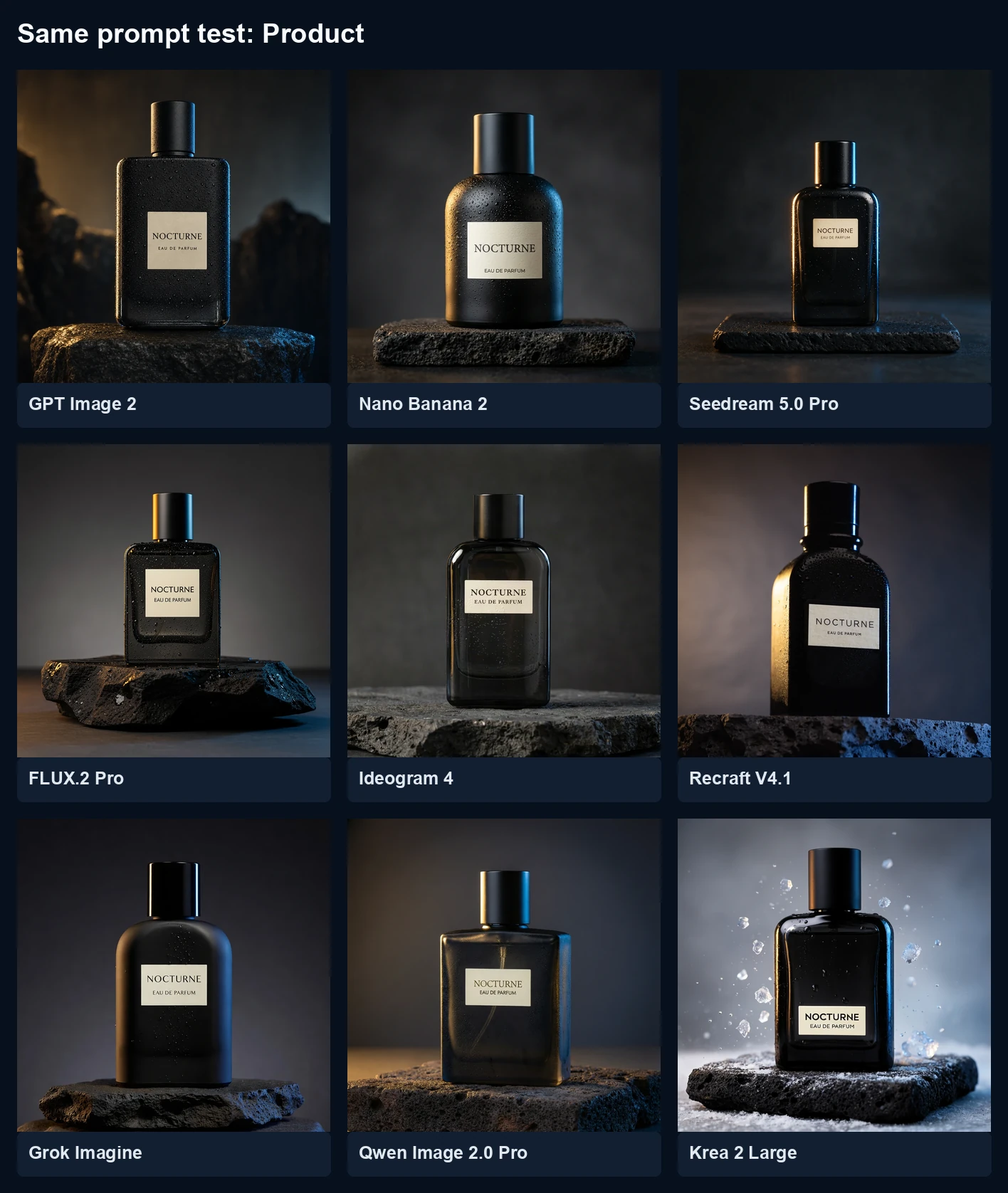
This was the closest test. Every model produced one black bottle, placed it on dark stone, used warm and cool edge lighting, and rendered the two requested label lines correctly.
GPT Image 2 delivered the strongest overall balance. Its bottle geometry, label, droplets, reflections, stone, and lighting all worked together as a believable campaign image. Nano Banana 2 was nearly as good, although its bottle was rounder than the requested rectangular form. Krea 2 Large produced the most dramatic advertising image, adding flying droplets and brighter contrast without being asked.
Ideogram 4 created the cleanest catalog-style bottle. Seedream 5.0 Pro followed the commercial lighting well but made the product smaller in the frame. Recraft V4.1 was the weakest fit for this specific brief: the bottle was tall, heavily shadowed, and less faithful to the requested rectangular geometry.
Product-test winners:
- Best overall product image: GPT Image 2
- Best dramatic campaign treatment: Krea 2 Large
- Best clean catalog composition: Ideogram 4
- Best fast result: Nano Banana 2
Test 2: Which AI image generator is best for text?
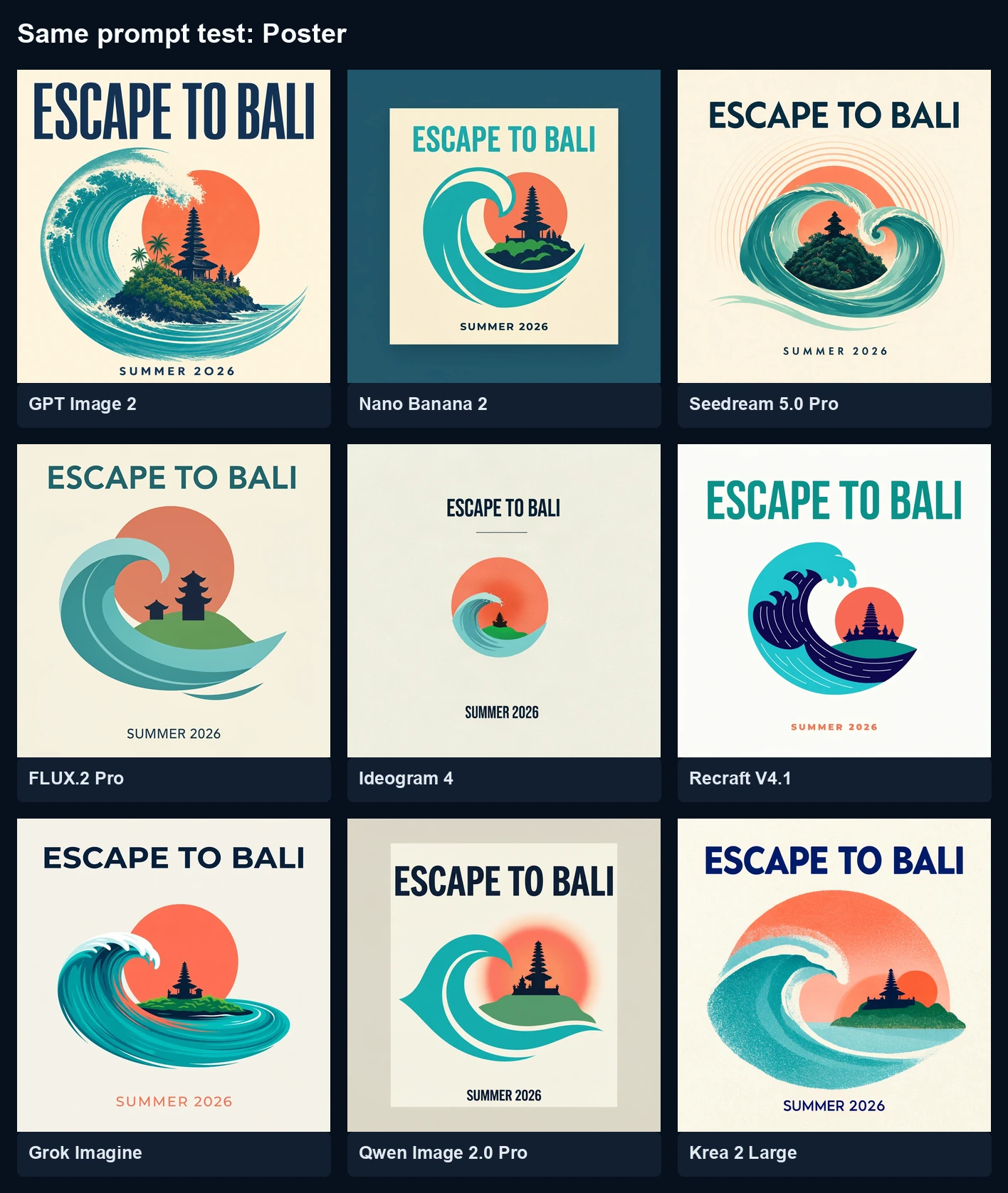
All nine models rendered “ESCAPE TO BALI” and “SUMMER 2026” correctly in this run. That result is important: basic display typography is no longer a feature that automatically separates one leading image model from the rest.
The differences appeared in art direction.
GPT Image 2 created the richest finished poster, with an expressive wave and strong type hierarchy. Seedream 5.0 Pro produced a similarly polished illustration with restrained detail. Recraft V4.1 created the cleanest vector-like brand graphic. Ideogram 4 rendered perfect text, but its central illustration was unusually small and left more empty space than the brief needed.
Qwen Image 2.0 Pro also reproduced both text lines, but framed the design inside a second border that made the result feel closer to a poster presentation than the flat artwork requested. Krea 2 Large had appealing texture but introduced an extra coral circle, making it the loosest interpretation of the single-sun instruction.
Typography-test winners:
- Best finished poster: GPT Image 2
- Best clean brand graphic: Recraft V4.1
- Best polished editorial illustration: Seedream 5.0 Pro
- Best typography-first model: Ideogram 4
Text accuracy should still be tested with your real material. A two-line English headline is much easier than a menu, paragraph, data visualization, or multilingual campaign. For those jobs, run the exact copy before choosing a model.
Test 3: Which AI image generator follows complex prompts best?
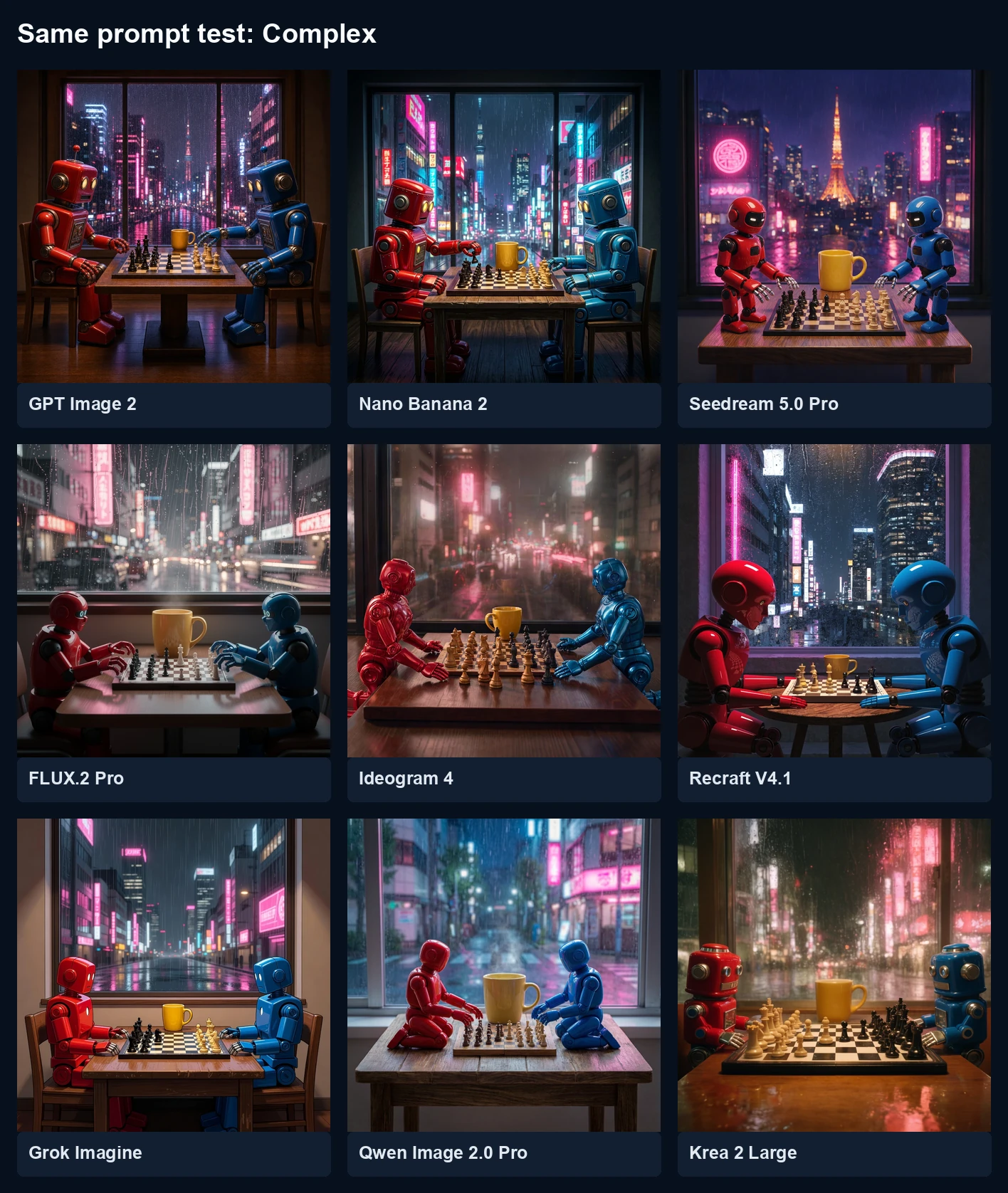
This prompt created the clearest separation.
Grok Imagine followed the large structural requirements particularly well: red robot left, blue robot right, both seated and visible, one chessboard, one yellow mug, and the rainy city visible through one central window. GPT Image 2 was also highly faithful and produced the most cinematic finished frame. FLUX.2 Pro kept the requested objects and positions while creating a convincing scene.
The misses were revealing. Seedream 5.0 Pro made the robots stand rather than sit. Qwen Image 2.0 Pro placed the robots on top of the table and exaggerated the mug. Recraft V4.1 and Krea 2 Large cropped the characters more tightly, weakening the “fully visible” instruction.
No result made the five-finger requirement clearly verifiable on all four robot hands at normal viewing size. That is a useful warning: even when the overall scene looks right, anatomy and small-object counts deserve close inspection before an image enters production.
Complex-prompt winners:
- Best spatial adherence: Grok Imagine
- Best combination of adherence and finish: GPT Image 2
- Best controlled alternative: FLUX.2 Pro
1. GPT Image 2: best AI image generator overall
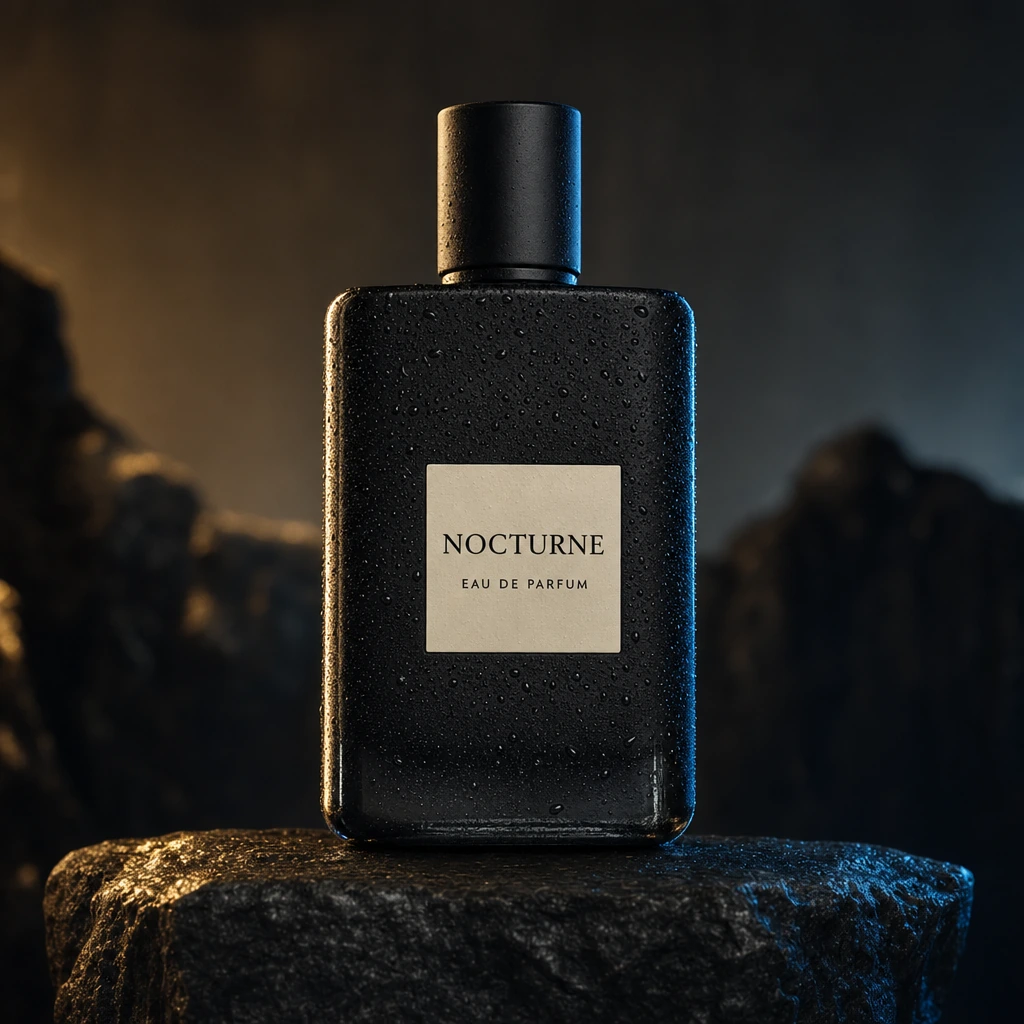
GPT Image 2 was the only model in this test that had no meaningful weak result. It produced the best-balanced product image, the strongest finished poster, and one of the two best complex scenes.
Its advantage was not simply realism. It understood the role of each image. The product shot looked like advertising, the poster looked designed rather than decorated, and the robot scene read immediately without sacrificing atmosphere.
Observed strengths:
- Consistent prompt adherence across three very different tasks
- Correct text in both typography tests
- Strong object geometry, materials, lighting, and composition
- Good balance between literal instructions and useful art direction
Observed limitations:
- It was the slowest model in this particular API run
- Small anatomy details still need inspection
- High-quality generations can cost more than faster model tiers
Choose GPT Image 2 if: you want the safest first choice for mixed professional work and do not want to change models for every prompt.
You can generate with it in the HighReach GPT Image 2 tool.
2. Nano Banana 2: best balance of speed and quality
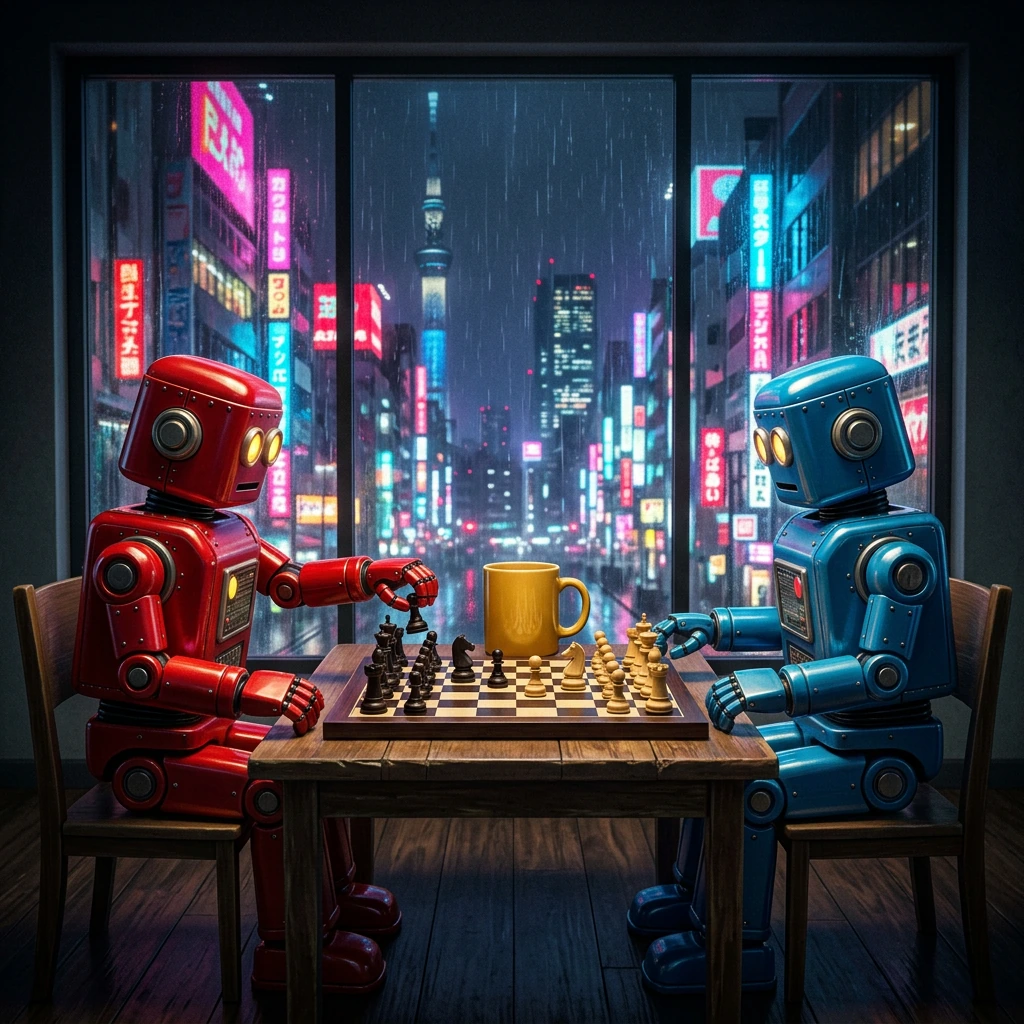
Nano Banana 2 is Google's Gemini 3.1 Flash Image model. Google positions it around fast iteration, world knowledge, subject consistency, precise instruction following, and resolutions up to 4K.
Our test supported the practical part of that positioning. It generated correct poster text, a convincing product shot, and a coherent complex scene without any major prompt failure. The product shape drifted from rectangular toward rounded, and the complex image was slightly busier than the best results, but both were immediately usable concepts.
Observed strengths: excellent first-pass consistency, accurate text, good object relationships, and attractive commercial lighting.
Observed limitations: a tendency to smooth or reinterpret shape details, plus less distinctive art direction than the strongest specialist result.
Choose Nano Banana 2 if: you expect to generate and revise frequently and want a high-quality model that prioritizes responsive iteration.
Try it through the HighReach Nano Banana 2 generator.
3. Grok Imagine: best for complex prompt adherence
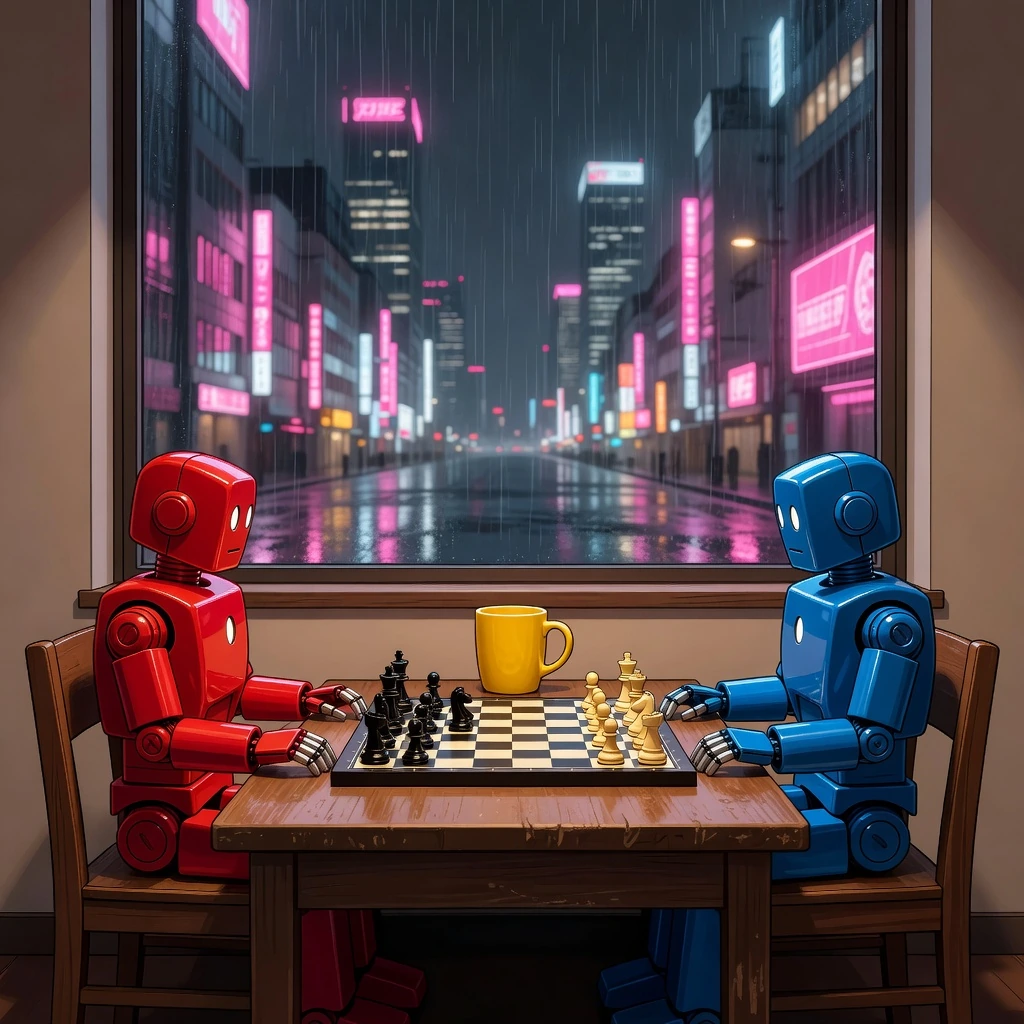
Grok Imagine produced our favorite structural response to the hardest prompt. It did not merely include the requested objects; it respected their roles and placement while keeping the scene legible.
The poster was also clean and text-accurate. Its product shot was less textured than the top entries and did not emphasize condensation, but the label and lighting were correct.
Observed strengths: excellent left-right positioning, strong scene clarity, correct text, and fast generation in our run.
Observed limitations: less material detail in the product test and a more literal visual style than GPT Image 2.
Choose Grok Imagine if: your prompts specify where several subjects must appear and scene structure matters more than subtle product texture.
Use the Grok Imagine image generator in HighReach.
4. Seedream 5.0 Pro: best for polished marketing visuals
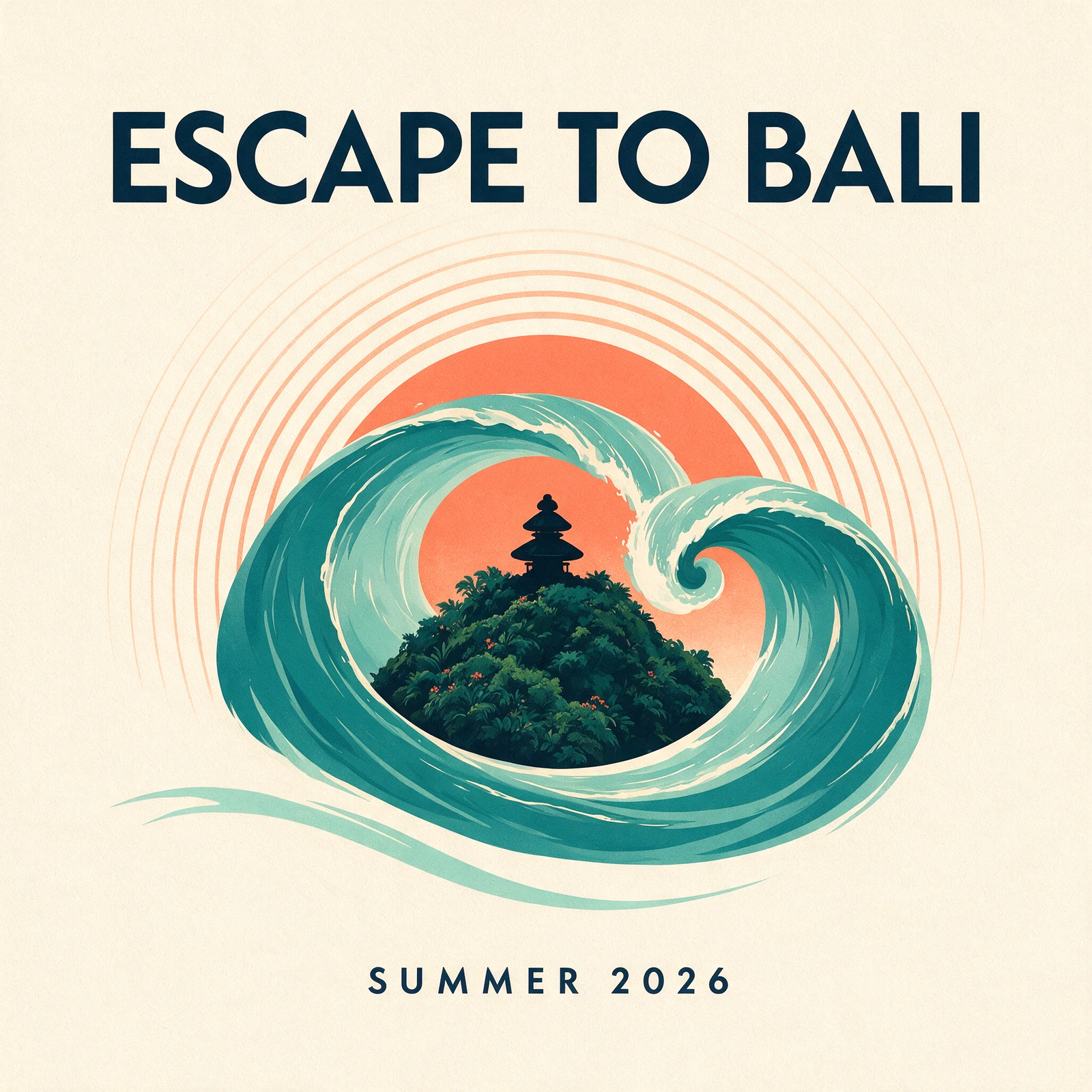
Seedream 5.0 Pro is ByteDance's production-focused image model. Its official materials emphasize dense information design, interactive editing, photographic materials, and multilingual generation.
The model excelled where taste and finish mattered. Its travel poster was refined, balanced, and ready to inspire a campaign. The product photo had convincing lighting and glass, although the bottle occupied less of the frame than most competitors.
Its main miss was literal: the complex prompt asked for two seated robots, but Seedream made them stand. Everything else—the colors, chessboard, mug, window, and rainy city—was present.
Choose Seedream 5.0 Pro if: you need polished marketing, editorial, or information-rich visuals and can review strict spatial instructions carefully.
5. Ideogram 4: best for typography-first design
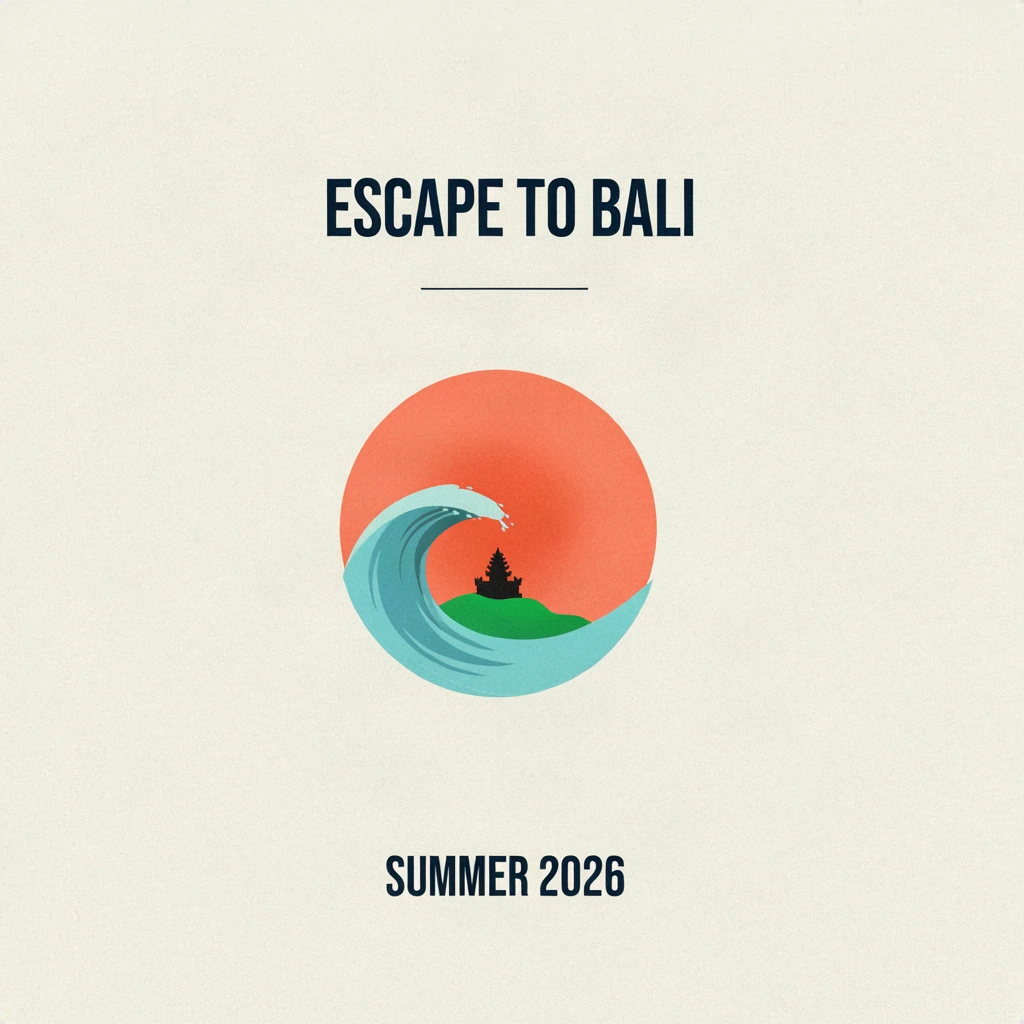
Ideogram 4 remains an easy recommendation when visible text is central to the image. Both our perfume label and travel-poster copy were correct, clean, and naturally integrated.
The product result was restrained and credible. The complex scene also followed the major instructions. Its travel poster, however, was almost too minimal: the text was excellent, but the illustration felt undersized relative to the canvas.
That reveals an important difference between text accuracy and graphic design. Correct lettering does not guarantee the best hierarchy, scale, or visual energy.
Choose Ideogram 4 if: logos, signs, headlines, packaging concepts, and poster copy are more important than maximum photorealism.
6. FLUX.2 Pro: best for controlled commercial generation
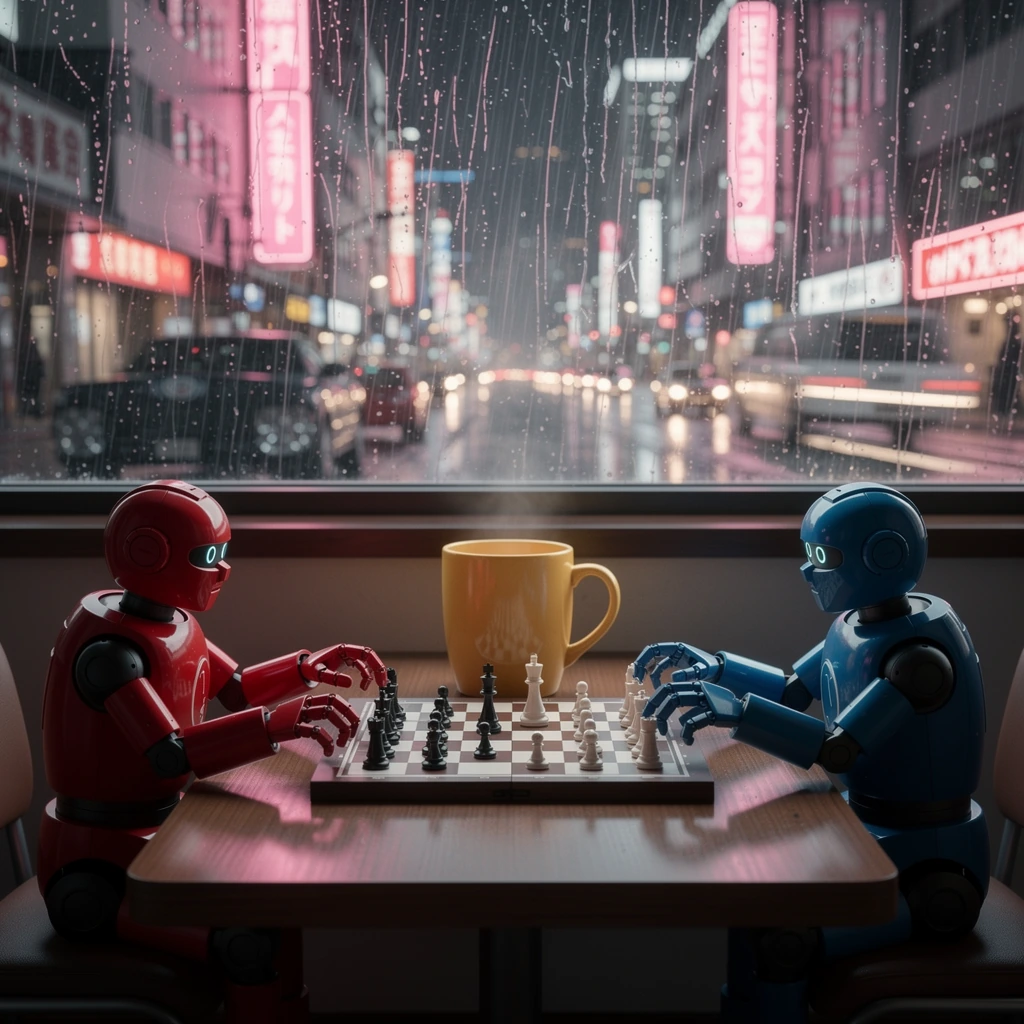
FLUX.2 Pro produced three dependable outputs without trying to overpower the prompt with its own style. Black Forest Labs supports structured prompting, exact color steering, flexible aspect ratios, and multi-reference workflows across the FLUX.2 family.
The robot scene was especially useful: correct positions, one board, one mug, and a plausible rainy window. Its poster was clean and accurate, while the product image looked more like a solid studio concept than a final luxury campaign.
Choose FLUX.2 Pro if: you value control, reproducible commercial assets, and a model that can extend into reference-driven production workflows.
Generate with the HighReach FLUX.2 Pro tool.
7. Krea 2 Large: best for aesthetic exploration
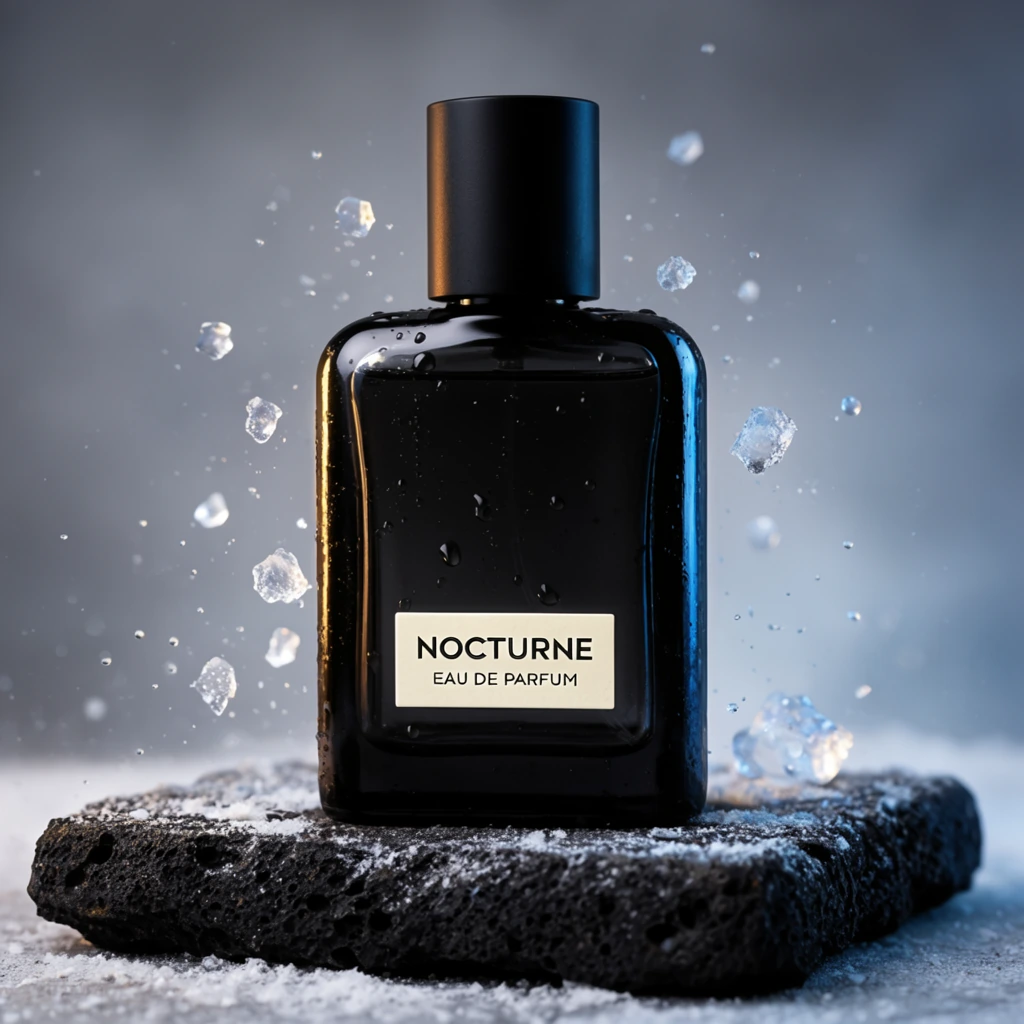
Krea 2 is built around aesthetics, style references, moodboards, and creative control. Its product result demonstrated that bias immediately: bright flying droplets, bold contrast, and a campaign-ready focal point made it one of the most visually memorable images in the set.
The same creative instinct can cause drift. Its poster introduced what appeared to be a second coral sun shape, and its complex scene cropped the robots instead of making them fully visible.
Choose Krea 2 Large if: you are exploring art direction and want visually assertive options, especially when style references matter more than literal compliance with every clause.
8. Recraft V4.1: best for clean brand graphics
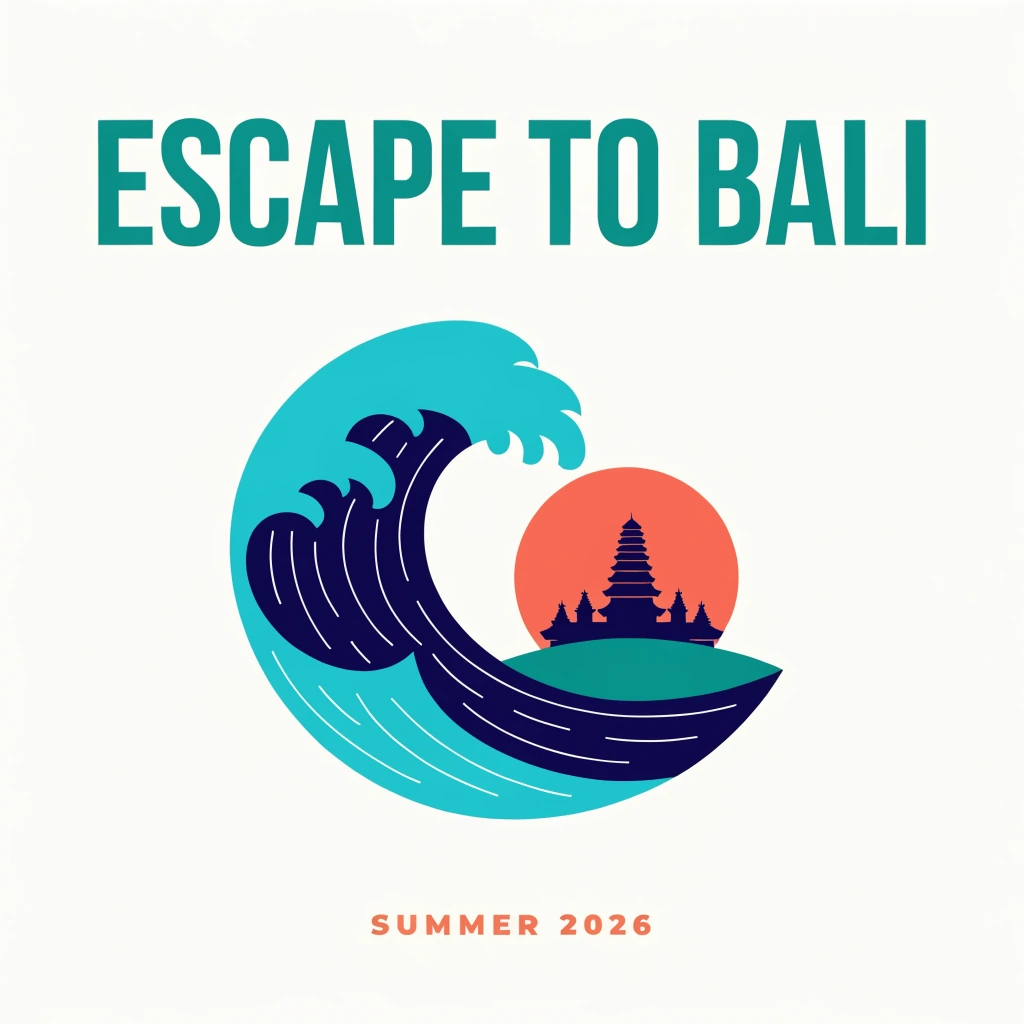
Recraft V4.1 produced the cleanest vector-like poster in our comparison. The type was exact, the colors were disciplined, and the wave-temple mark could plausibly become the beginning of a brand system.
The product image was less successful. Heavy shadow and a narrow bottle silhouette weakened the premium product brief. The complex image was attractive but cropped the robots below the table edge.
Choose Recraft V4.1 if: you create brand concepts, editorial graphics, icons, or clean campaign assets and are willing to switch models for photorealistic product work.
9. Qwen Image 2.0 Pro: a promising text-capable alternative
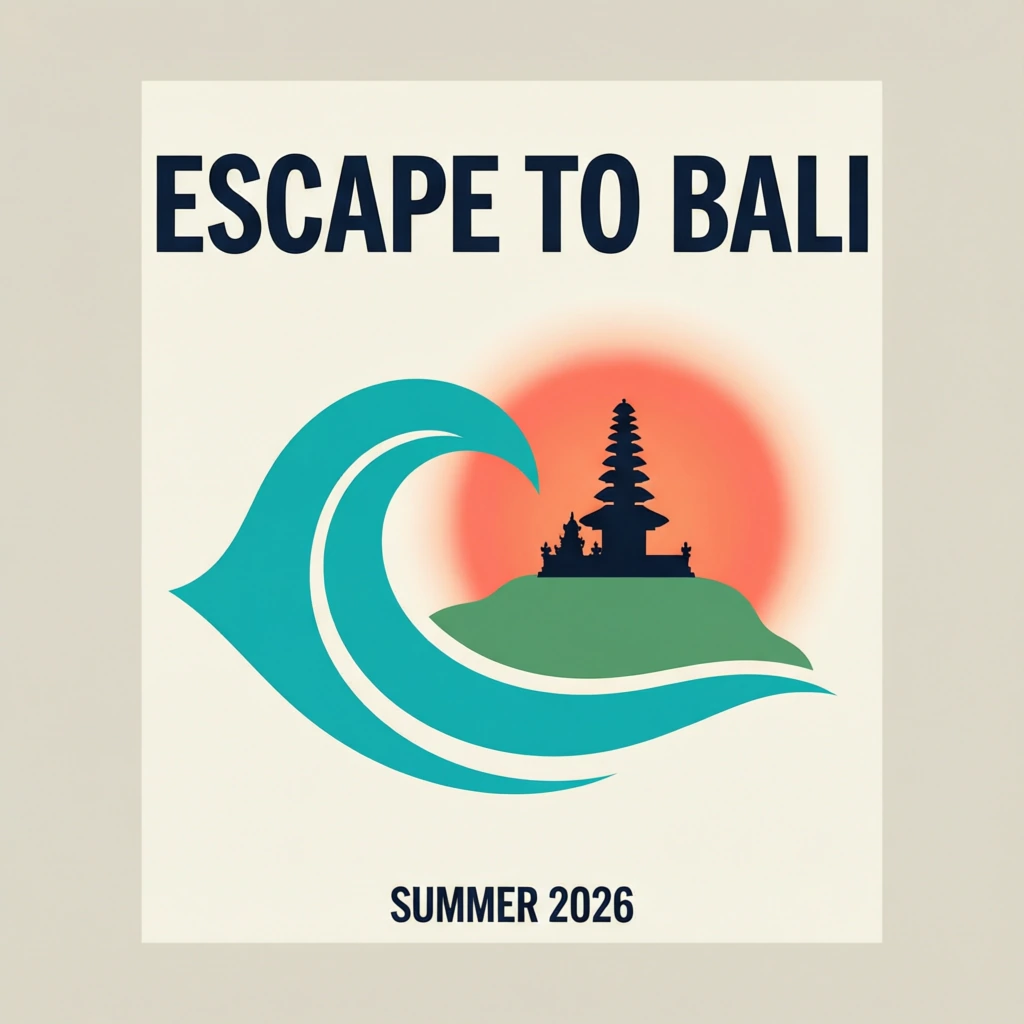
Qwen Image 2.0 Pro delivered accurate English text and a competent product image. Its poster was clean, although the additional inset frame departed from the flat-artwork instruction.
The complex scene revealed its main weakness in this run: the robots looked as if they were sitting on the tabletop, the mug became disproportionately large, and the chess setup was less coherent than the leading results.
The Qwen image family has historically emphasized text rendering and editing, including both alphabetic and logographic languages. That makes it worth testing when multilingual content matters, but one English poster is not enough to validate a localization workflow.
Choose Qwen Image 2.0 Pro if: you want another text-capable model to test, especially for multilingual work, and can closely review spatial relationships.
AI image models versus AI image generator apps
An image model is the engine that interprets a prompt and creates pixels. GPT Image 2, Nano Banana 2, FLUX.2 Pro, and Ideogram 4 are models or model families.
An AI image generator is the product layer around one or more models. It adds prompting controls, image uploads, editing, history, asset management, team access, and billing.
This distinction matters because the best-looking model is not automatically the best working environment. A designer may prefer Adobe Firefly because the image can continue into Photoshop. A social team may prefer Canva because templates and publishing matter more than model control. A studio may prefer a multi-model platform because no single model wins every shot.
HighReach's AI image generator is built around that multi-model approach. You can generate with several current models, compare results, and continue into AI image editing or a focused product photoshoot workflow without maintaining a separate process for every provider.
Popular AI image generators we did not include in the ranking
We intentionally excluded products that could not be run through the same FAL test harness. Including them without comparable outputs would make the ranking look more comprehensive but less honest.
- Midjourney: still relevant for highly aesthetic image creation and community-driven exploration. Its current product is separate from this API comparison, so we did not assign it a rank.
- Adobe Firefly: a strong choice for Creative Cloud users who want generation and editing connected to Photoshop, Illustrator, and Adobe Express. Adobe also offers partner models inside Firefly.
- Canva: better evaluated as a template and publishing workflow than as one underlying image model. It is useful when a generated image is only one part of a social post, presentation, or campaign.
- Leonardo AI: combines generation, editing, model choice, and creator tooling in its own platform. We would need to test the complete workflow—not substitute another model's output—to rank it fairly.
How to choose the right AI image generator
Do not choose from a general leaderboard alone. Start with the kind of image that costs you the most time.
Choose GPT Image 2 for mixed professional work
It is the strongest default when your week includes product concepts, posters, illustrations, and complicated prompts rather than one narrow image type.
Choose Nano Banana 2 for rapid iteration
Use it when generation and editing are conversational, speed matters, and you expect to revise the same concept several times.
Choose Ideogram or Recraft for design-led images
These are sensible first tests for posters, packaging, graphic marks, and assets where clean typography or a vector-like finish matters.
Choose Grok Imagine or FLUX.2 Pro for structured scenes
Both handled the difficult object-placement prompt well. They deserve a test when the composition contains multiple named subjects and fixed positions.
Choose Seedream or Krea when art direction matters
Seedream produced polished marketing work. Krea created the most assertive visual treatment. Both are useful when you want the model to contribute taste rather than follow instructions mechanically.
A practical workflow for better AI-generated images
- Write the non-negotiable facts first. Name the subjects, count, position, required text, aspect ratio, and exclusions before describing style.
- Separate content from art direction. A prompt is easier to debug when object requirements and visual treatment are written as distinct sentences.
- Generate the same brief in two models. Compare interpretation before spending ten attempts trying to force one model into a weak use case.
- Inspect text, hands, reflections, and object counts at full size. These details can fail even when the thumbnail looks excellent.
- Edit instead of restarting. Once composition is correct, use an AI image editor to fix a localized problem while preserving the rest of the frame.
- Finish for the channel. Crop, resize, add real brand typography, and verify usage rights before publishing.
What is the best free AI image generator?
Free access changes frequently and usually comes with generation limits, slower queues, watermarks, reduced resolution, or restricted commercial terms.
Nano Banana 2 is available through Google's consumer products, and Krea advertises daily free credits. Canva, Adobe Firefly, Leonardo, and other platforms also offer limited ways to begin without a full subscription. The best free option is the one that allows enough generations to test your real prompt—not the one with the longest feature page.
Before using a free output commercially, check the provider's current terms, plan restrictions, privacy policy, and provenance requirements.
Frequently Asked Questions
What is the best AI image generator in 2026?
GPT Image 2 is the best overall AI image generator from our three-prompt test. It produced the most consistently useful combination of product realism, correct text, graphic design, and complex-scene adherence. A specialist model may still be better for a particular workflow.
Which AI image generator is best for text?
Ideogram 4 is the clearest typography-first recommendation, while GPT Image 2, Nano Banana 2, Seedream 5.0 Pro, Recraft V4.1, and the other tested models also rendered both required English text lines correctly in our poster test. Always test the exact copy and language you intend to publish.
Which AI image generator is best for product photography?
GPT Image 2 produced the best overall product photograph in our test. Krea 2 Large made the most dramatic campaign image, while Ideogram 4 created a clean catalog-style result. For real products, use reference images and verify that labels, geometry, colors, and packaging remain accurate.
Which AI image generator follows prompts most accurately?
GPT Image 2 was the most consistent across all three prompts. Grok Imagine followed the hardest spatial prompt especially well, and FLUX.2 Pro was another reliable option for controlled scenes.
Is Midjourney better than these AI image generators?
Midjourney can be an excellent choice for aesthetic exploration, but we did not rank it because it was not available through the same FAL API test used for the nine models in this article. A fair answer requires running the same prompts in Midjourney and comparing both its outputs and workflow.
Can I use AI-generated images commercially?
Commercial-use rules vary by provider, model, plan, input material, and jurisdiction. Read the current terms before publishing client work or paid campaigns, keep records of your prompts and source assets, and do not assume that an AI output is automatically exclusive or protectable.
Final verdict
If you want one recommendation, start with GPT Image 2. It was the most reliable all-rounder in our original test.
Choose Nano Banana 2 when fast iteration is central to the workflow. Try Grok Imagine for complex spatial prompts, Seedream 5.0 Pro for polished marketing visuals, Ideogram 4 for typography, FLUX.2 Pro for controlled commercial scenes, Krea 2 Large for style exploration, Recraft V4.1 for clean graphics, and Qwen Image 2.0 Pro as a multilingual text-capable alternative.
The larger lesson is that there is no reason to choose an AI image generator from a vendor's best demo. Take three real prompts from your own work, run one honest first attempt in several models, and compare the mistakes as closely as the successes.
That is how you find the best AI image generator for the work you actually do.