Research-backed product profile
Last checked August 25, 2026
Synthesia AI video generator review: avatars, pricing, and verdict
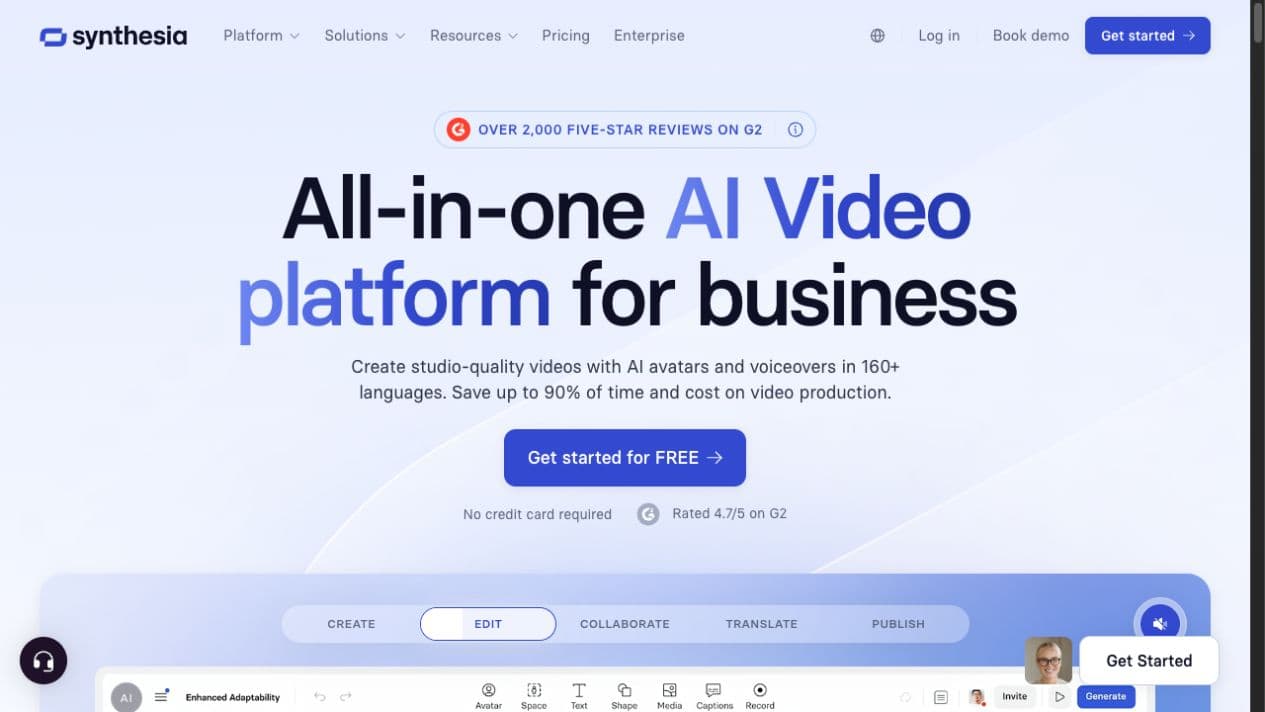
Synthesia is an AI video generator for business that turns prompts, scripts, links, PDFs, and presentations into presenter-led videos with AI avatars, voiceovers, generated visuals, translation, collaboration, interactivity, and analytics.
Best for
Training, onboarding, enablement, explainers, and localized business video
Learning curve
Low for basic presenter videos; moderate for interactive and enterprise workflows
Platform
Web browser
Main trade-off
The best avatar, interactivity, localization, collaboration, and LMS features are split across higher-priced plans
About Synthesia
What the product does and where it fits
Synthesia replaces much of a conventional presenter-video workflow with a browser editor. Start with an idea or existing material, let its AI Video Assistant draft scenes and narration, select an avatar and voice, then edit the result using layouts, media, captions, branding, and generated B-roll. The result is a complete business video rather than a single text-to-video clip.
The platform is especially strong when a team must update or localize the same information repeatedly. A script can be revised without arranging another shoot, and one-click translation extends a project across more than 160 languages. Interactive buttons and branching are available on higher plans, while quizzes, SCORM export, SSO, advanced team controls, and the full avatar library are concentrated in Enterprise.
Synthesia now includes broader generative tools, including image and video models inside its AI Playground, but its product design still prioritizes structured, on-brand communication. Teams seeking open-ended cinematic experimentation across many independent image, video, and audio workflows may prefer a broader multi-model studio.
Ideal users
Who is Synthesia best for?
The strongest use cases for Synthesia come from teams whose production needs match its most opinionated workflows.
Learning and development teams
Create and update training, compliance, onboarding, and skills content without organizing repeated shoots.
Sales enablement teams
Turn decks, product updates, and playbooks into consistent presenter-led explainers for distributed teams.
Global organizations
Translate one approved source video into many languages while keeping delivery and brand presentation consistent.
Internal communications
Publish repeatable leadership updates, process changes, and company announcements without camera logistics.
How it works
How to use the Synthesia AI video generator
A practical start-to-finish workflow for turning source material into a finished Synthesia video.
- 01
Start with source material
Enter a prompt or script, paste a link, or import a PDF, document, or presentation to create a first draft.
- 02
Choose the presenter and voice
Select a stock avatar, build a personal avatar, and pair it with a voice and language appropriate for the audience.
- 03
Edit scenes and branding
Refine the script, layouts, captions, media, generated visuals, music, colors, logos, and interactive elements.
- 04
Generate, translate, and publish
Render the video, create localized versions, collect feedback, and share through an MP4, embed, branded page, or supported LMS workflow.
Capabilities
Top Synthesia features
These are the capabilities most likely to affect the buying decision and day-to-day creative workflow.
AI Video Assistant
Turns prompts, documents, decks, links, and scripts into editable scenes with narration and suggested visuals.
AI avatars and digital twins
Offers 240+ stock avatars at the Enterprise level plus customizable, personal, studio, and interactive avatar options.
160+ languages and voices
Generates multilingual voiceovers, captions, translation, dubbing, and lip-sync without recording each version again.
Editor and generated visuals
Combines layouts, templates, screen recordings, captions, motion graphics, AI images, and cinematic B-roll in one project.
Interactivity and learning delivery
Supports clickable buttons and branching on Creator, with quizzes and SCORM export reserved for Enterprise.
Collaboration, governance, and analytics
Adds comments, shared workspaces, brand controls, version updates, viewer analytics, SSO, and enterprise security workflows.
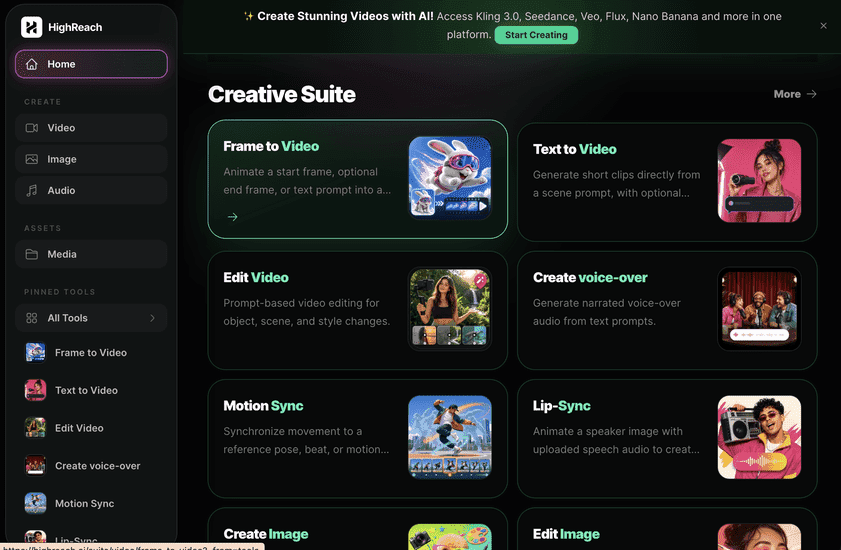
Create across leading video, image, and audio models in one studio
Choose Synthesia when the main deliverable is a structured presenter-led business video with avatars, translation, interactivity, analytics, and LMS delivery. Choose HighReach when you want broader control over generative production across leading image, cinematic video, audio, avatar, editing, and transformation models in one creative suite. Synthesia optimizes a business-video format; HighReach optimizes multi-model creative range.
Pricing
Synthesia pricing snapshot
Basic free; Starter $29/month; Creator $89/month; Enterprise custom. Compare included usage, exports, storage, collaboration, and AI limits rather than choosing on headline price alone.
Basic
$0
1,200 credits per month, usable for up to 10 minutes of video or about 25 AI-generated assets; 9 avatars and Synthesia branding.
Starter
$29/mo
1,200 credits, up to 10 video minutes, 125+ avatars, downloads, AI Video Assistant, dubbing, and logo removal.
Creator
$89/mo
3,600 credits, up to 30 video minutes, 180+ avatars, five personal avatars, API access, multiple avatars per scene, branded pages, and interactive videos.
Enterprise
Custom
Unlimited video minutes, 240+ avatars, unlimited personal avatars, SSO, live collaboration, Brand Kits, SCORM, onboarding, support, and custom credits.
Pricing checked August 25, 2026. Promotions, annual discounts, regional pricing, taxes, credits, and plan limits can change.
Check current pricingTrade-offs
Synthesia pros and cons
The practical strengths and limitations to consider before adopting the product for a recurring workflow.
Pros
- Very approachable prompt, script, and document-to-video workflow
- Large avatar, voice, and language catalog for repeatable localization
- Strong fit for training, onboarding, enablement, and internal communication
- Interactive video, analytics, collaboration, and enterprise governance in one platform
- Easy to revise scripts and regenerate presenter videos without a new shoot
Cons
- Creator pricing jumps sharply from the Starter tier
- Quizzes, SCORM, SSO, and the full avatar library require Enterprise
- Longer or complex videos can still take time to generate and review
- Presenter-led output can feel less natural than filmed human footage
- Open-ended cinematic creation is less flexible than a dedicated multi-model studio
User feedback
What G2 reviews say
Recent G2 feedback strongly favors Synthesia's ease of use, realistic avatars, repeatable templates, and ability to update training or presentation videos without filming. Recurring cautions concern generation time, plan cost, credit or feature limits, and the need to review pronunciation, pacing, gestures, and visual choices before publishing.
G2
4.6/5
2,785 reviews
Open review sourceCommon praise
- Simple and intuitive editor
- Major time savings for training content
- Consistent avatars and reusable projects
- Useful custom avatars and multilingual delivery
Recurring cautions
- Generation can take time for longer projects
- Higher-value features are plan-gated
- Pronunciation and avatar delivery still need QA
Review scores and counts are snapshots and may change. Themes are summarized rather than quoted to avoid overstating any single review.
Verdict
Is Synthesia worth it?
Synthesia is one of the strongest AI video generators for repeatable business communication. Its free plan is generous enough to test the core workflow, and Starter works for light individual use. Creator or Enterprise makes the most sense when personal avatars, interactive delivery, localization, collaboration, governance, and LMS integration save enough production time to justify the higher price.
FAQ
Synthesia frequently asked questions
Short answers to the questions buyers commonly ask before choosing a creative software platform.
What is the Synthesia AI video generator?
Synthesia is a browser-based AI video platform for business. It turns prompts, scripts, links, documents, PDFs, and presentations into editable videos with AI avatars, voiceovers, captions, generated visuals, translation, collaboration, interactivity, and analytics.
Is Synthesia free to use?
Yes. Synthesia's Basic plan includes 1,200 credits per month, usable for up to 10 minutes of video, 9 stock avatars, AI voices in 160+ languages, and core creation tools. Free videos retain Synthesia branding and do not include every paid export, avatar, brand, or collaboration feature.
How much does Synthesia cost?
As checked on August 25, 2026, Basic is free, Starter is $29 per month, Creator is $89 per month, and Enterprise uses custom pricing. Included credits, video minutes, avatars, seats, downloads, interactivity, and enterprise controls differ by plan.
How do you create a video with Synthesia AI?
Start with a prompt, script, URL, PDF, document, or presentation. Choose an avatar and voice, edit the generated scenes and branding, add captions or visuals, then generate the video. Paid plans add downloads, personal avatars, interactive elements, API access, and broader team workflows.
Can Synthesia translate AI videos?
Yes. Synthesia supports voice and video creation across more than 160 languages and accents. Translation, dubbing, captions, and lip-sync help teams localize one approved video without filming every language version separately, although plan limits vary.
What is Synthesia best used for?
Synthesia is best suited to presenter-led training, onboarding, compliance, sales enablement, product explainers, internal communications, and localized business videos. It is less specialized for unrestricted cinematic experimentation or hands-on professional timeline editing.
What are the main disadvantages of Synthesia?
The strongest interactive, LMS, governance, avatar, and collaboration capabilities sit on higher plans. Avatar delivery can still require quality checks, longer projects take time to generate, and presenter-style output may not suit campaigns that need natural human performance or highly cinematic visual control.
How is Synthesia different from HighReach?
Synthesia is optimized for structured business videos built around AI presenters, translation, interactivity, analytics, and LMS delivery. HighReach is a broader multi-model creative suite for generating and transforming image, video, audio, avatar, and campaign assets with more freedom to choose the production model and workflow.
Research notes
Sources and disclosure
HighReach is not affiliated with Synthesia. Product names and trademarks belong to their owners. We checked official product and pricing documentation on August 25, 2026, kept factual claims separate from our assessment, and linked the sources below. Features and prices can change after that date.
- Synthesia homepageCurrent positioning, workflow, languages, use cases, and feature overview
- Synthesia pricingPlans, credits, video minutes, avatars, and feature limits checked August 25, 2026
- Synthesia text to videoPrompt, document, generated-visual, avatar, and translation workflow
- Synthesia interactivity docsButtons, branching, quizzes, player requirements, and SCORM availability
- Synthesia security practicesPublished security controls and audit framework
- Synthesia on G2Current rating, review count, and recurring user-feedback themes
- Creatify Synthesia reviewSERP competitor perspective used to identify comparison intent; facts verified against official sources